
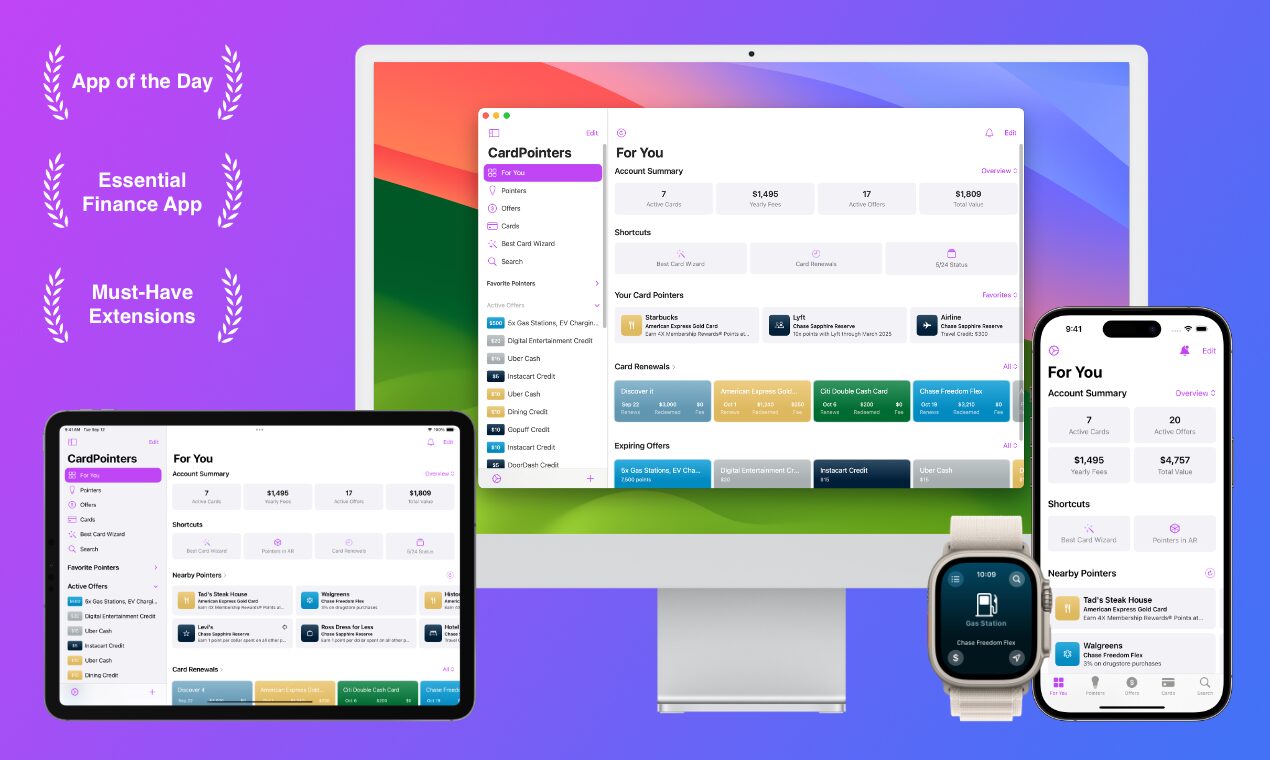
CardPointers is an app/website/browser extension that helps you track all your credit cards, their various benefits, etc. Its most popular feature is the ability to auto-enroll card-linked spending offers like Amex Offers, Citi Offers, etc. Rather than having to go through and manually click to enroll in each offer, CardPointers will automatically do that for you.
The Deal
- Save 30% on annual and lifetime CardPointers memberships.
- Direct link to offer (our affiliate link)
Key Terms
- Annual membership – $63 per year, even after your first year (normally $90)
- Lifetime membership – $196 (normally $280)
Quick Thoughts
Update: Having used the app since the beginning of 2025, I now love it. It’s ridiculously convenient having CardPointers auto-load offers, rather than needing to manually click on each one.
Another huge convenience is being able to quickly see which cards have an offer loaded to them for a specific retailer at a glance. My wife and I went to Ikea a couple of times last month to buy some furniture, home goods, etc. I’d noticed that there was an Ikea Chase Offer and knew that we’d be spending enough to spread the cost across multiple cards in order to earn several statement credits. Rather than having to log in to both of our accounts and click through to each of our cards to see if they’d been targeted for it, I was simply able to check the CardPointers app and see which of the cards had it loaded already. Doing that probably only saved me 10-15 minutes, but it removed that tediousness from my life and that’s not the only time I’ve used that functionality.
Below is my original assessment of the app.
~
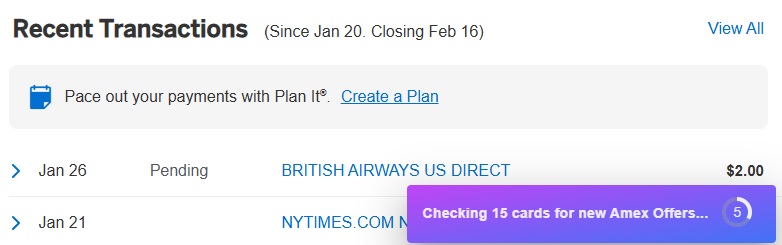
I’ve seen CardPointers regularly mentioned in various groups over the last year or two, but had procrastinated on registering myself until recently. Although I set up an account and downloaded the app a week or two ago, I hadn’t gotten around to linking my cards until last night. To be honest, I was initially confused about how to do that as I’d assumed CardPointers would use some kind of service like Plaid in order to do that, but it’s done via its Chrome browser extension. After setting up an account and downloading the extension, simply log in to your account(s) and you should see an option to add the relevant offers. For example, when logging in to my Amex account there was a small box at the bottom showing that offers were being added.
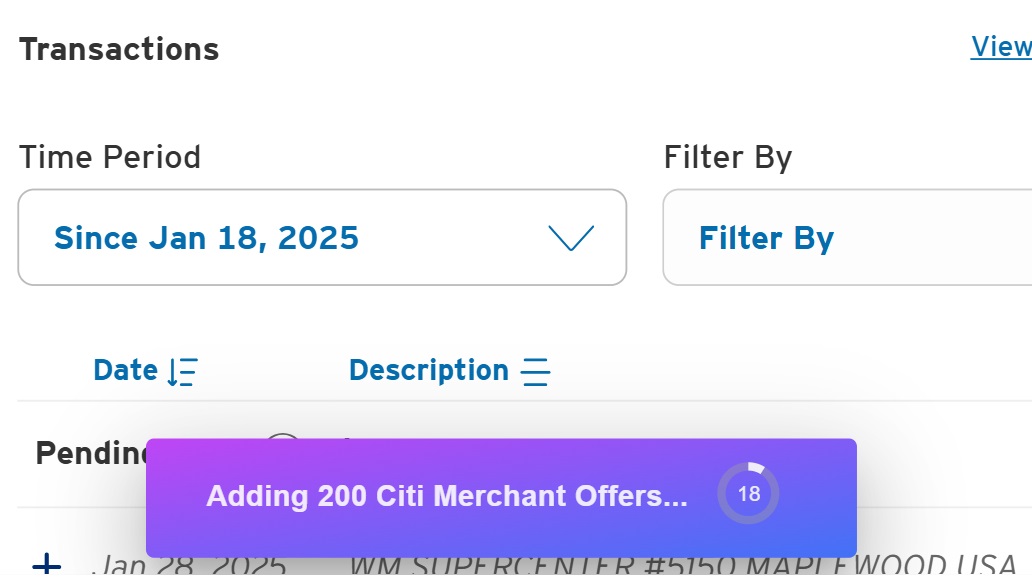
When logging in to Citi, a similar thing happened:
Once offers are loaded to your account, you can view them using either the CardPointers browser extension or app. To view via the browser extension, click the jigsaw icon at the top-right of Chrome and select CardPointers X:
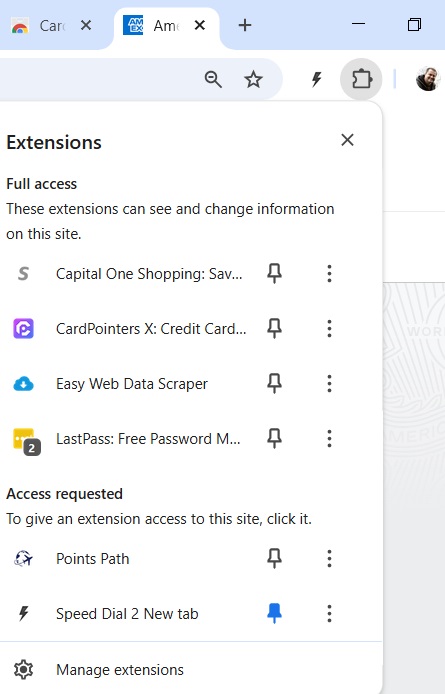
That’ll display a popup with three menu items, the middle of which is ‘Offers’. Clicking on the Offers tab will display all the offers now loaded to your card(s). It defaults to displaying them alphabetically, but over time I imagine it’ll be more convenient to sort them by date added to more easily see what’s new.
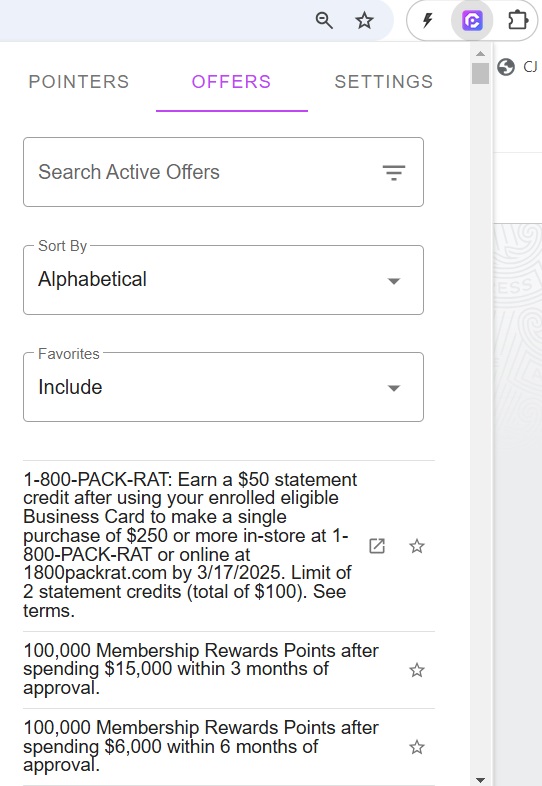
In the app, there’s an ‘Offers’ menu button at the bottom which does a similar thing. In the app you can also filter by category (e.g. airline offers, hotel offers, restaurant offers, etc.). Both the extension and app have search functionality too, so if there’s a specific offer you’re interested in, that’s an easy way to see if any of your cards were targeted.
Seeing as I’m so new to the app, I can’t speak to many quirks that it might have. However, I have seen people mention before that you need to verify that your card does actually have an offer loaded to it before trying to redeem it, rather than solely relying on the CardPointers app or browser extension stating it is.
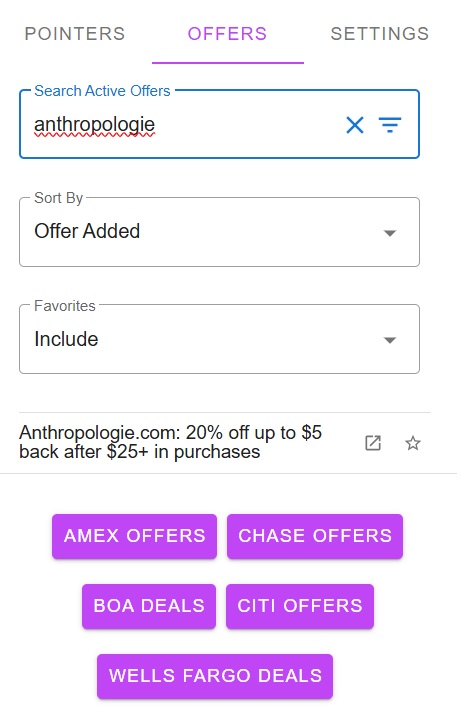
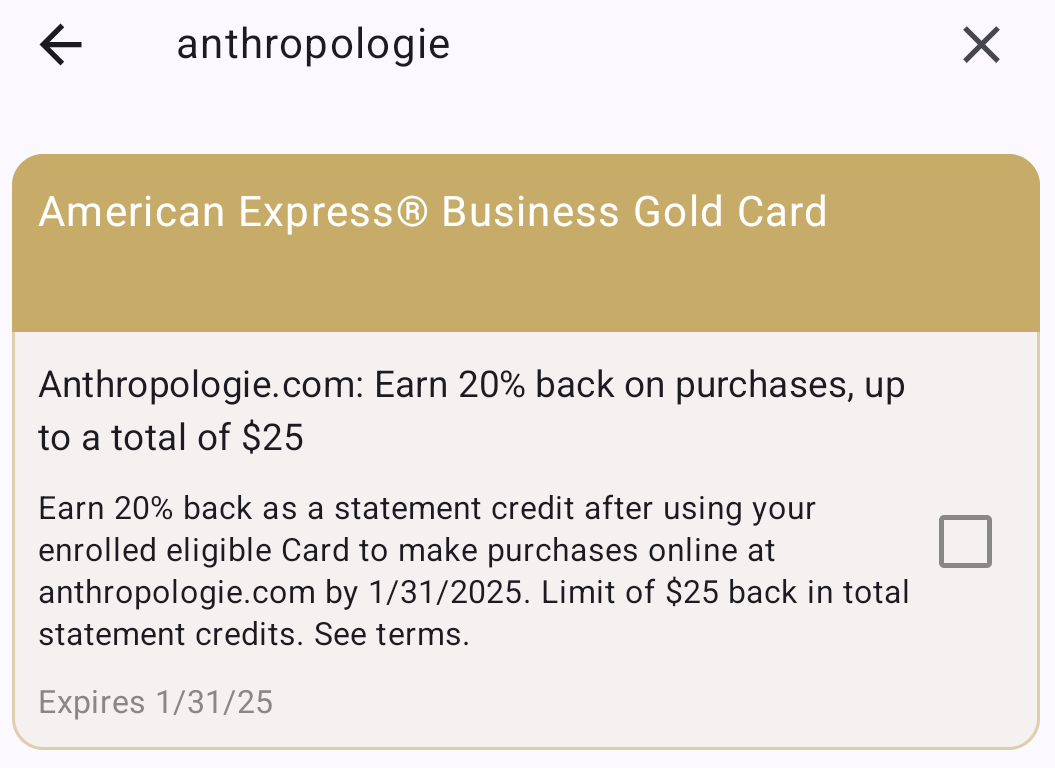
It’s also worth verifying the full details of an offer yourself. When acquainting myself with the app last night, I noticed that the browser extension stated that an Anthropologie Amex Offer was giving 20% back on $25+ purchases with a limit of up to $5 back. I’d tried to use this Amex Offer a week or two ago and so knew that was incorrect – the offer was valid on up to $125 of spend (i.e. up to $25 back).
The app meanwhile did display the correct details:
The CardPointers browser extension also reminds you if you have a money-saving opportunity on one or more of your cards, although once again you’ll want to verify the offer details. For example, when playing Wordle last night it let me know that I could save by using my Schwab Platinum card. That’s presumably courtesy of the Digital Entertainment Credit which is valid on New York Times subscriptions (Wordle is owned by the New York Times), although the text box stated I could save 2% on the purchase which initially seemed like it wasn’t correct.
n.b. If you don’t want to see this kind of popup for any given retailer, you can click the X in the top-right corner of the purple box and select that you don’t want to see the popup anymore for that retailer, or you can just snooze it for a while.
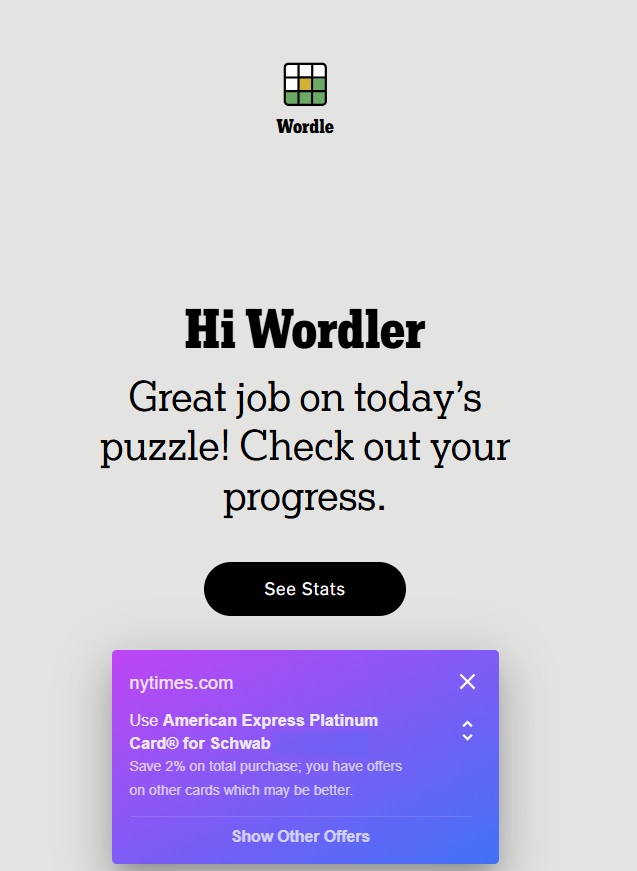
I thought that perhaps that display was a little goofy due to it being a Digital Entertainment Credit rather than an Amex Offer. I therefore tested it out with Anthropologie, but that displayed a 2% offer too.

However, at the bottom of that box it has a prompt to ‘Show Other Offers’. If you click on that, it’ll display other related offers like the Digital Entertainment Credit for the New York Times and the Amex Offer for Anthropologie.
Overall though, CardPointers looks like it’s an extremely useful tool which you might find comes with some unexpected benefits, especially if you like to utilize and maximize Amex Offers. Although $63 per year or $196 for a lifetime subscription (or cheaper when there are additional sales available) might sound expensive as a new user, I’ve heard enough about it to know that it could certainly save you significantly more money than that over time. I’m therefore looking forward to finally getting around to using it myself.
 Want to learn more about miles and points? Subscribe to email updates or check out our podcast on your favorite podcast platform.

Is subscription for one person or household?
I have family sharing enabled, so it will grant access to all members of your family, and you can link them as additional user profiles, too.
How do I get the $200 savings card that is being offered for buying the lifetime membership that is being offered by other YouTubers? Is it only available for other affiliate links?
Hi, not all links have that offer, but you can always email me at support@cardpointers.com and I can help with that manually if you didn’t purchase directly through the App Store/Play Store (they take 30% of sales). Thanks for using + supporting the app!
I have 12 different Amex logins for my cards. Would Cardpointers work to add Amex offers to all of these logins?
There’s been a server-side limit of 10 requests at once for a little while now, but it should handle offers on 10 eligible cards like a champ.
How does it handle AmEx offers where you can only add the offer to one of your cards? If I have the AmEx Platinum, Gold, and Business Plus, does it determine which card is most beneficial for the offer and if its a restaurant (Gold gives 4x), and adds it to the best card?
It does better than that, it adds it to all cards which have it available so you can use the best offers multiple times.
I thought Amex only allowed an offer to be used on one card, and if you use it on more than that, they call back the credit
I’m only aware of them clawing back statement credits on a single Amex Offer and that was about a decade ago. That’s not to say it won’t happen again, but so far that appears to have been an isolated incident.
Cardpointers hasn’t been working for me for a while to multiple offers to different cards. It just adds the offer to one card
There have been a few Amex issues I’ve had to work around (I think they’ve put some junior developers or bad AI bots to work, they’re returning a lot of malformed JSON lately which I’ve had to work around). The latest update, v7.2.9, should address all edge cases, but if you’re still having an issue after updating please email me at support@cardpointers.com to help. Thanks!
I wish this app had a better UI like MaxRewards
Sorry to hear you aren’t a fan of the UI, are you on iOS or Android? I did a huge redesign with v7 in Liquid Glass for all of the Apple platforms but that does require iOS 26+, and I’m working on a refresh for Android as well with the v7 update on that platform. Hopefully you’ll like the big update!
Is the android done yet? I have the same issue as Mr Seg, the UI is not up to expectations.
I launched v7 on Android last week, using the new Material Expressive design language.
Great I will check it out !
I am curious how CardPointers refreshes the offers without user logging on their credit card site on their frequent basis.
Offers are auto-added and sync’d every time you log into the bank websites you use, instead of using and storing your bank logins as that would put you at risk. It syncs in just a few seconds and you’ll see a progress indicator at the bottom of the website right after you log in.
CardPointers has been having issues with Amex where offers are not adding to all the card that have them. This seems to be an issue for many users. Until this is fixed, SaveWise as others have mentioned, would be a better investment. As far as I’m aware (haven’t bought yet), they have no issues with Amex.
Hi, I’m sorry you’ve had trouble, there is a 7.1 update I’ve been working on which will be live shortly to address the issue when an Amex server fails to load the list of offers (that is indeed a problem on their end, and affects folks even when not using any extension at all). If you need further help please email me at support@cardpointers.com so I can look into your specific account and help further. Thanks!
Want to pile on and note that the app has been completely failing to add offers recently for many users. Very disappointing. Developer seems not to be doing anything to fix it. Reports are that SaveWise is working fine so folks may want to look at that option instead.
Second this. The developer can’t make the primary function of the app work, yet spends resources adding more features of limited value.
Hmm? Whenever there’s an issue I handle it usually within 24 hours which you can see several times this past year; Amex, Chase, Citi, and US Bank all made some changes to their APIs and I had updates across every platform very quickly, and I’m very transparent about that and post updates as each platform is updated on the CardPointers subreddit. If you have any specific issues please do email me at support@cardpointers.com, thank you, and I hope you have a good new year.
Hi, I’m sorry you’ve had trouble, there is a 7.1 update I’ve been working on which will be live shortly to address the issue when an Amex server fails to load the list of offers (that is indeed a problem on their end, and affects folks even when not using any extension at all). If you need further help please email me at support@cardpointers.com so I can look into your specific account and help further. Thanks!
I do love cardpointers. My biggest complaints are the pop up on every website to use the venture capital one card and an unintelligible layout on chase travel that requires me to pause the extension. Other than those, love it and the developer is super nice and responds personally to all questions!!
i second to your complaint about pop up… also when I want to see the offer, the pop up is too short and couldn’t get to read which card to use…
You can fully customize the shopping pointers to show longer, only show offers vs category rewards, and more. Tap the X then Open Settings, or open the extension’s full pop up and go to the Settings tab.
Hi, what do you mean about a layout issue? Can you please email me screenshots to support@cardpointers.com? As I mentioned in the other comment below, you can customize the shopping pointers in many ways as well, but always happy to help with some more info via email. Thanks and happy new year!
I have Savewise. Is Cardpointers basically the same thing?
The app is essentially still in beta stage. Lots of issues loading offers to multiple cards, and you often get locked out of seeing your offers on the Amex website for days. The developer somehow blames Amex IT for the app problems.
Hi, I’m sorry you’ve had trouble, there is a 7.1 update I’ve been working on which will be live shortly to address the issue when an Amex server fails to load the list of offers (that is indeed a problem on their end, and affects folks even when not using any extension at all). If you need further help please email me at support@cardpointers.com so I can look into your specific account and help further. Thanks!
Maybe this is a dumb question, but does signing up condemn a person to constant hounding about the offers by email, text notifications, etc.? “DaveS, you only have three days to take advantage of the 2% off on $100 spend offer from XYZ company.” If it works quietly in the background, that’s one thing; but if it won’t leave me alone, that’s something else.
No, you don’t have to get lots of notifications. I can’t remember if it defaulted that way or if I switched it off early on, but in the app there’s an option you can toggle on and off to get notifications of expiring offers.
I don’t ever get any notifications from the app and I only get one email a week; I could presumably unsubscribe from that email too if I wanted.
I think Dave is referring to those offers that come directly from Amex if you sign up for an offer. I use one of my rarely used AMEX cards as a sock drawer for those offers that I will never be interested in so that I don’t clog up my active cards with offers that I do want. Once you sign up for an AMEX offer on one card it disappears from all of your other cards, plus you can’t have more than 100 offers available on one card. When your inactive card gets to 100 available (not claimed) offers, it keeps the good offers from appearing on your better cards. Also – Amex offers a notification service at an additional fee to companies that post offers in order to email customers right before expiration letting them know that the offer is getting ready to expire. It’s additional advertising, and why most of the offers don’t send out notifications on expiration but some do.
It’s probably worth mentioning that while adding offers to multiple cards have been working smoothly for many months and well worth the subscription, in recent months it has become more and more unstable, judging by both my own anecdotal experience and the reddit sub for the app. My understanding is that this is not the fault of the app, but nevertheless it’s highlighting that the gravy train could stop any day now if Amex deploy counter measure on their server, not dissimilar from how the multi tab method stopped working years ago.
It’s almost entirely back to normal now, and the 7.1 update will work around any lingering issues with the list of offers not loading when a bad Amex server rears its head.
Mr Crouvisier:
Are you planning to include the Capital One Shopping offers that require a Cap 1card? I’ve sometimes found them quite valuable.
And what do you do with our information?
Thanks
Hi, CapOne offers work very differently than the normal card-linked offers, it’s really just a gated shopping portal, so there isn’t a way to integrate those at this time, but stay tuned as I have something big planned for the near future.
I don’t collect anything sensitive by design, so there isn’t anything to share or that would be at risk. Only your card names as you enter them in the app, or the offers that you add to your cards via the extension if you choose to sync them with CardPointers, is ever stored on my servers. And none of that is ever shared with or sold to any third party (no one would find that useful, anyhow!)