

The Chase Ink Business Cash® card is a mainstay in the FM Team’s wallets, primarily due to its ability to earn 5x Ultimate Rewards points on up to $25,000 in annual purchases at office stores and cellular/landline/cable providers.
Although the limit resets every year on the card anniversary, it’s still been fairly easy to track because Chase provided a summary of your activity from your last card anniversary. So you’d see something like, “Since your June ’25 statement cycle.” Once that graph reset, you knew that you were in your new cardmember year.

However, Chase recently changed how it displays your yearly earnings. Now, instead of tracking it by cardmember year, it’s tracking by calendar year, as shown below:
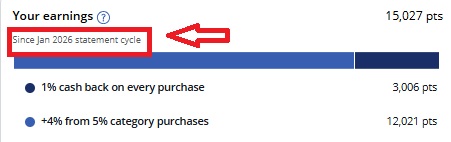
Now, every Ink Cash card we have lists the same “Since Jan 2026 statement cycle.” That’s led many cardholders to assume that the $25k annual limit now applies to the calendar year.
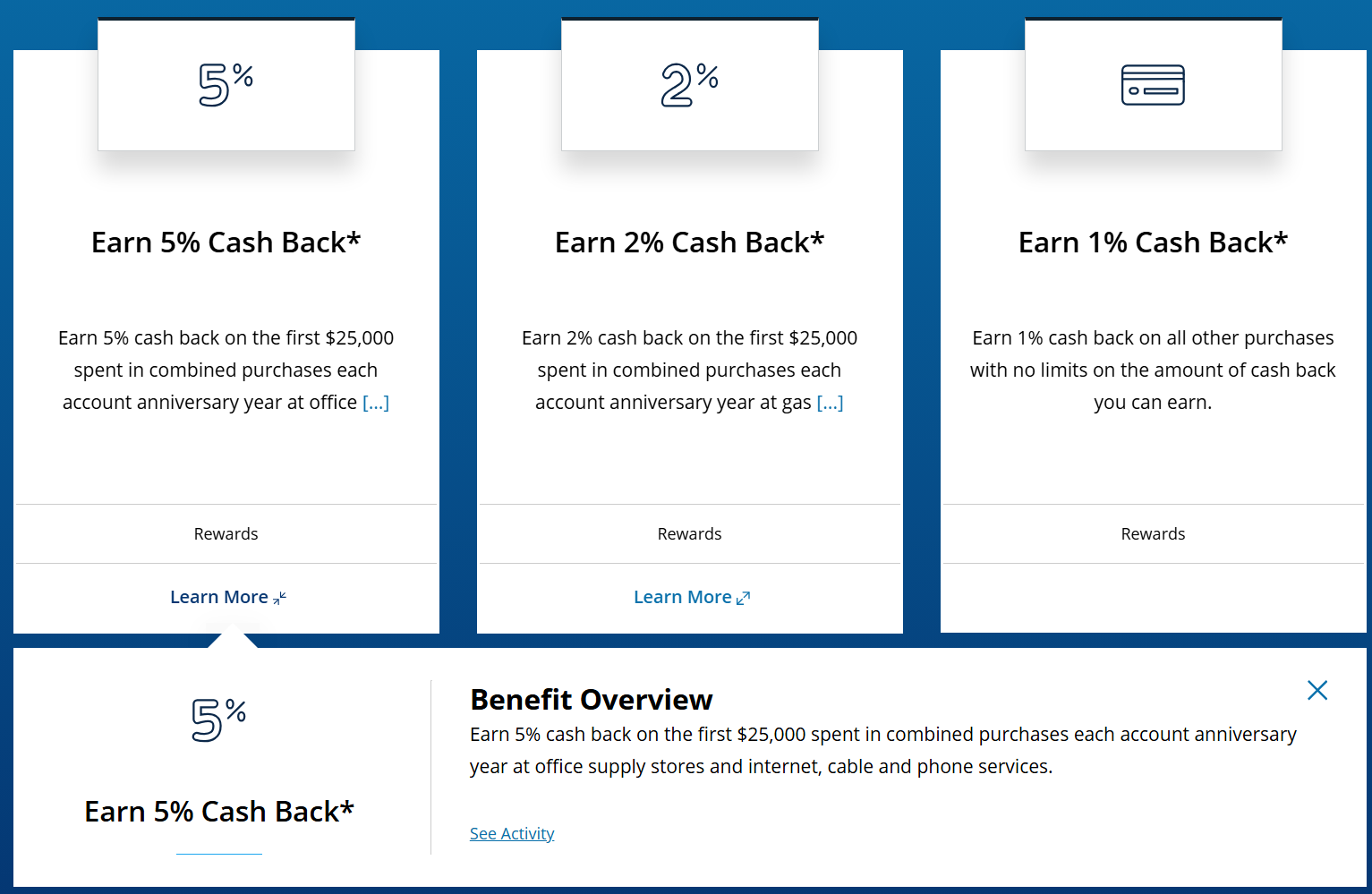
That is not the case…at least not yet. Chase still defines the $25k limit by cardmember year, NOT calendar year. This is shown in the app:

As well as on the card benefits page:
Quick Thoughts
We have no idea whether Chase intends to change the $25k maximum on 5x rewards to a calendar-year limit, but it hasn’t done so yet. It has, however, changed the way it tracks what you’ve spent. We also don’t know whether that’s a temporary glitch or a permanent change.
That’s incredibly unfortunate, as most cardholders are used to seeing where they stand relative to their limit in the rewards tracker. Now that it shows the calendar year, it’s no longer a reliable indicator of where you actually are, which will undoubtedly lead many people to put some spend on the card, assuming they’re earning 5x, when in reality they’ll only earn one point per dollar.
Hopefully, Chase clarifies this soon. In the meantime, if you usually max out your $25k of yearly 5x spend, it behooves you to track it manually to avoid disappointment at the end of the year.
 Want to learn more about miles and points? Subscribe to email updates or check out our podcast on your favorite podcast platform.



Does anybody know when the clock starts if you product change from ink unlimited? Would it be the anniversary date of the card? or from when the product was changed?
in my case, they reset the clock starting with the NEXT billing period after the product change.
Thanks for the post. I was wondering what was going on.
I’ll be the guinea pig. Before the change, I had about $1,600 left of my $25,000. I put $1,776 or so on the card yesterday at Office Depot, so I’ll know in the next few days whether I got the 5x on all $1,776 or just the $1,600 that was left prior to this change.
It posted. I only got it on the $1,600 that was left of my $25,000, so despite that the counter now presents your usage as though it’s based on calendar year, it is still actually based on account anniversary year, as the terms state.
Hope this helps someone!
That does help, thanks. I really hope Chase fixes this because this is ridiculous that we have to track it ourselves now.
So what’s the best way to get another Ink Cash card if I already have one?
It’s important to note that “account anniversary year” means the year beginning with your account open date through the first statement after the anniversary of your account open date, and each 12 billing cycles after that” per the terms of the Ink Cash account agreement. https://static.chasecdn.com/content/dam/card/rulesregulations/en/RPA0475_Web.pdf
So the anniversary year starts about a month after you open the card since the anniversary year runs through the 1st statement date. One year I spent quite a bit of 1x at office stores because I thought the anniversary year ended one year from the date i was approved for the card.
I’m going through withdrawal on Visa or MC gift cards from Staples since I blew through my inventory a week ago. They haven’t been in sale the last 2 weeks. I got spoiled with them having either Visa or MC on sale at least every other week. I’m thinking they have to put one of them back on sale this Sunday.
mastercards should be on sale starting sunday
Thanks for the heads up!
real first world problem for me since 25000 isn’t easily divisible by 1800 or 593.85
I just secured messaged Chase to see exactly when my card anniversary is for that exact reason. Either way, I always spend exactly $2,100.00 per month on it which is $200.00 over the max, but whatever. At least I know I am getting 125,200 points per year from it. Better than a sign up bonus for very organic yearly spend I have to do either way.
Seems like this would be a target rich environment for MaxRewards or similar app to handle. There’s lots of cards with similar kinds of targets, like the Custom Cash for $500, or spend targets for rewards the annual Hilton Surpass $15K for the FNR, Atmos Summit for the 100K global companion pass, etc.
Good luck even finding the transfer to partners link on the portal – they hide it. Chase knows exactly what it is doing.
I usually combine points from my Chase Ink business card to my wife’s Sapphire Reserve. But since we are going to dump her Sapphire Reserve when the next annual fee comes up, I read this post and decided to see how difficult it was to find the Ink’s Transfer to Partners link. Took me all of about five seconds to find the link. I bet I can do it even faster next time!
Great! Wasn’t very concerned about commenters on travel websites being able to figure it out.
For those who are not focusing on this, they made it harder.
When you log in, you have to go to Benefits & travel and then hit Rewards, not Travel. I’ll bet you most people think they’re redeeming for travel, hit Travel, and then get pushed to the Chase Travel portal (where Chase wants people to redeem their points).
If you do hit Rewards, you then get directed to a page with stats and tons of links, but not a link on the page itself to transfer points to partners. Again, pushing other things.
You then need to either click on the Travel tab at the top of the page (one of a number of tabs – happens to be the last one) and then Transfer points to partners (the last option) OR click on “All ways to redeem” and then scroll down to the 10th and last option on the page to Transfer points (after they show you the monetary value of your points in lots of other categories).
My point (ha) is that they are clearly burying this. It’s not that it’s being pulled as a feature, it’s not that they won’t market it. It’s that they are promoting everything else first.
When you talk about points with folks, and they are like “oh I redeemed my points for travel” and you ask a follow up question, often they are talking about redeeming points through a travel portal, not transfer partners. This is because the banks are expressly promoting those redemptions as the preferred and easiest option. The entire reward structure of all of the premium cards is now heavily rewarding spend through the portal and, with Chase, PointsBoost and redeeming points through the portal.
You and I know better, of course. But for the vast majority of people, this is how they redeem their points. Just look at Amex’s top three ways people redeemed points from last year – transferring points to partners did not make the list.