

A month ago, after years of an open seating policy, Southwest Airlines began selling assigned seating. Over the past week, I’ve had my first experiences with Southwest’s new assigned seating, and I’ve come away pretty underwhelmed and wondering if my experience was a one-off, or a sign of too many glitches in the matrix.
The short version of the story is that we had 4 passengers under separate reservations on the same itinerary, but we saw different seat maps that made it impossible for us to select an open seat next to our 8-year-old son, though we ran into a couple other glitches as well.

Assigned seating seems simple enough
For starters, the Southwest process for handling assigned seating seems pretty straightforward and simple. If you buy a basic fare, your seat gets assigned to you when you check in. If you buy a Choice fare or higher, you get some seat selection options. If you have a Southwest credit card, you get the ability to select your seat at the time of booking, with some variance based on which card you have. Cardholders and elites then have a mechanism to select Extra Legroom seating for free prior to departure. All of that seems pretty simple and standard airline practice.
However, my experience with most of the above has been a weird mix this week.
The background story
I flew Southwest yesterday, and the process of booking had a few complexities that require some explanation. The very simple version of the story is:
- My family of four was booked under 4 separate confirmation numbers
- My wife and I both have the premium Southwest credit cards that allow for Standard or Preferred seat selection from the time of booking and extra legroom at 48 hours prior to departure, and in this case, those benefits should have also extended to our sons traveling with us
- We saw 3 different versions of the seat map, with my older son, my wife, and I all seeing different seats available for selection, which meant that neither my wife nor I could select an open seat next to our 8-year-old son.
That last bullet point is really where the heart of the story is, but the story leaves more questions than information without some of the finer details.
To expand a bit on the bullet points above:
- We were four travelers: Me (henceforth known as “P1” for “Player 1”), my wife (henceforth known as “P2”), our 8-year-old son (“P3”), and our 5-year-old son (“P4”)
- We were under 4 separate confirmation numbers:
- My wife (P2) has the companion pass and expected to add P3 as her companion (the companion always gets a separate confirmation number/PNR). There were only 3 tickets for sale at the moment when we booked this flight, so we initially booked three of us (P1, P2, and P4) and then added P3 with the Companion Pass less than 24hrs prior to departure when another ticket opened up for sale.
- I had expected to earn the Companion Pass before the trip. I booked my seat separately from my wife’s reservation, and I expected to add P4 to my reservation before we traveled.
- Unfortunately, I didn’t earn the Companion Pass in time, so I had to book a separate reservation for P4. Because it appeared that he was an unaccompanied minor, I had to specify an adult who was traveling with him. I entered my wife’s information, and the system automatically associated his (separate) reservation with hers. That linkage will come back later, but it is important to understand that he wasn’t added to her confirmation number but rather had his own confirmation number that was linked to hers in the same sort of way that a Companion Pass companion gets a separate confirmation number that is linked to the Companion Pass holder. In the end, she had 2 “unaccompanied” minors associated with her reservation.
- P2 has the Southwest Rapid Rewards® Priority card, which includes free Standard or Preferred seat selection at booking and free Extra Legroom seating 48 hours prior to departure (based on availability).
- P1 (which is me) has the Southwest® Rapid Rewards® Performance Business credit card, which offers the same seating benefits.
We did a lot of this booking (really rebooking) within a couple of days of departure, at which point very few seats were still available for seat selection.
As a final point of background, I noted above that P4 was booked as a separate ticket that was “associated” with P2’s reservation. He was booked on a Choice fare, so he had some access to free seat selection at the time of booking, but not to Preferred Seating. If he had been booked under the same confirmation number as P2, her credit card seating benefits would have automatically extended to him. Since he was under a completely separate reservation, her benefits did not automatically extend to him. For example, at 48 hours prior to departure, his seat map still showed a fee for Extra Legroom seats. I attempted to just pay the fee so we could get him seated next to my wife, but the system errored out and wouldn’t take payment. I had to call Southwest to resolve it. After two hours on hold to get to an agent, the phone agent told me that my wife’s seating benefit should extend to P4 as a minor — and, sure enough, the agent was able to assign him the extra legroom seats next to my wife on both flights with no fee.
Getting seated together was a fiasco
As noted above, all of the arrangements for the flights we took yesterday were made within 1-3 days of departure. We were originally scheduled to fly on Sunday, but we took advantage of weather waivers and changed to flights on Tuesday. At the time when we made the change, the phone agent with whom I spoke said that we would keep the same seat assignments on the new flights. I knew that couldn’t be true, but at the moment when we made the change, there were enough open extra legroom seats that I didn’t expect it to matter since I expected that we would all end up in extra legroom seating.
As it turned out, the four of us were automatically assigned 4 entirely separate seats apart from each other (like, not even close to each other).
As I tried to sort out seat selection, things got really wacky.
As a Southwest Rapid Rewards Performance Business cardholder, I could choose a Standard or Preferred seat at the time of booking, or an Extra Legroom seat at 48 hours prior to departure.
On our first flight, at 48 hours prior to departure, I selected seat 3C, which was an Extra Legroom seat.
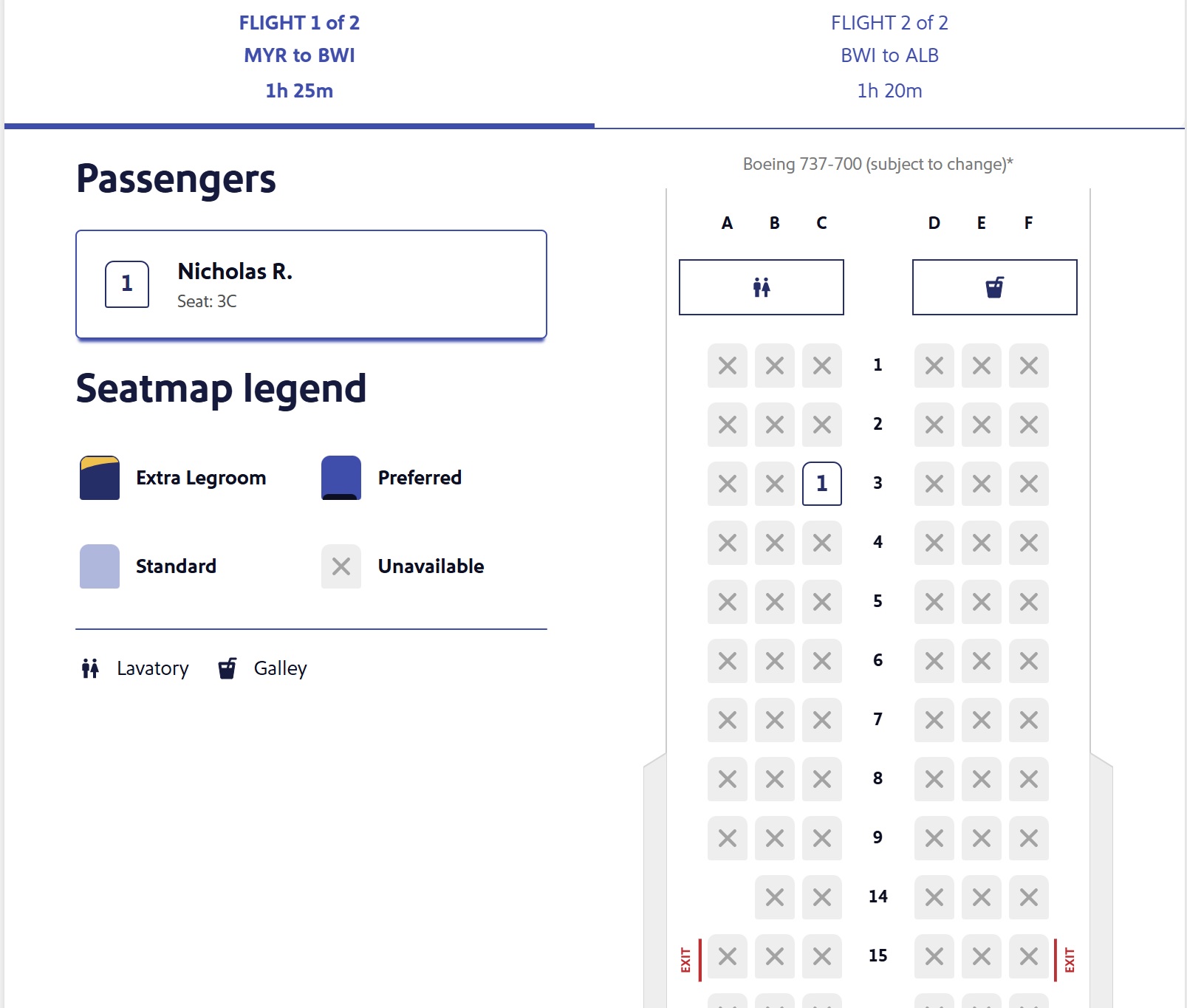
At this point, I should mention that while I selected that seat 48 hours in advance, the seat map you see above is a screenshot of the seat map that I saw on Monday, less than 24 hours prior to departure. As you can see, there were zero other seats available for selection at that moment, according to the seat map I saw. I couldn’t change seats as no seats were available for selection.
I had selected seat 4D for my wife at the 48-hour mark, but I took the screenshot below at the same time as the one above (I had both reservations open in separate browser tabs). As you can see, when logged into my wife’s reservation, there was one additional seat available for selection — Seat 16B (while you can’t see that seat clearly in my seat map above, you can tell that it has an “X” and isn’t available in my seat map, but it is available in hers). We wouldn’t have wanted that seat, but it is notable that the seat appeared to be open according to the seatmap that my wife saw, but not the seatmap that I saw.
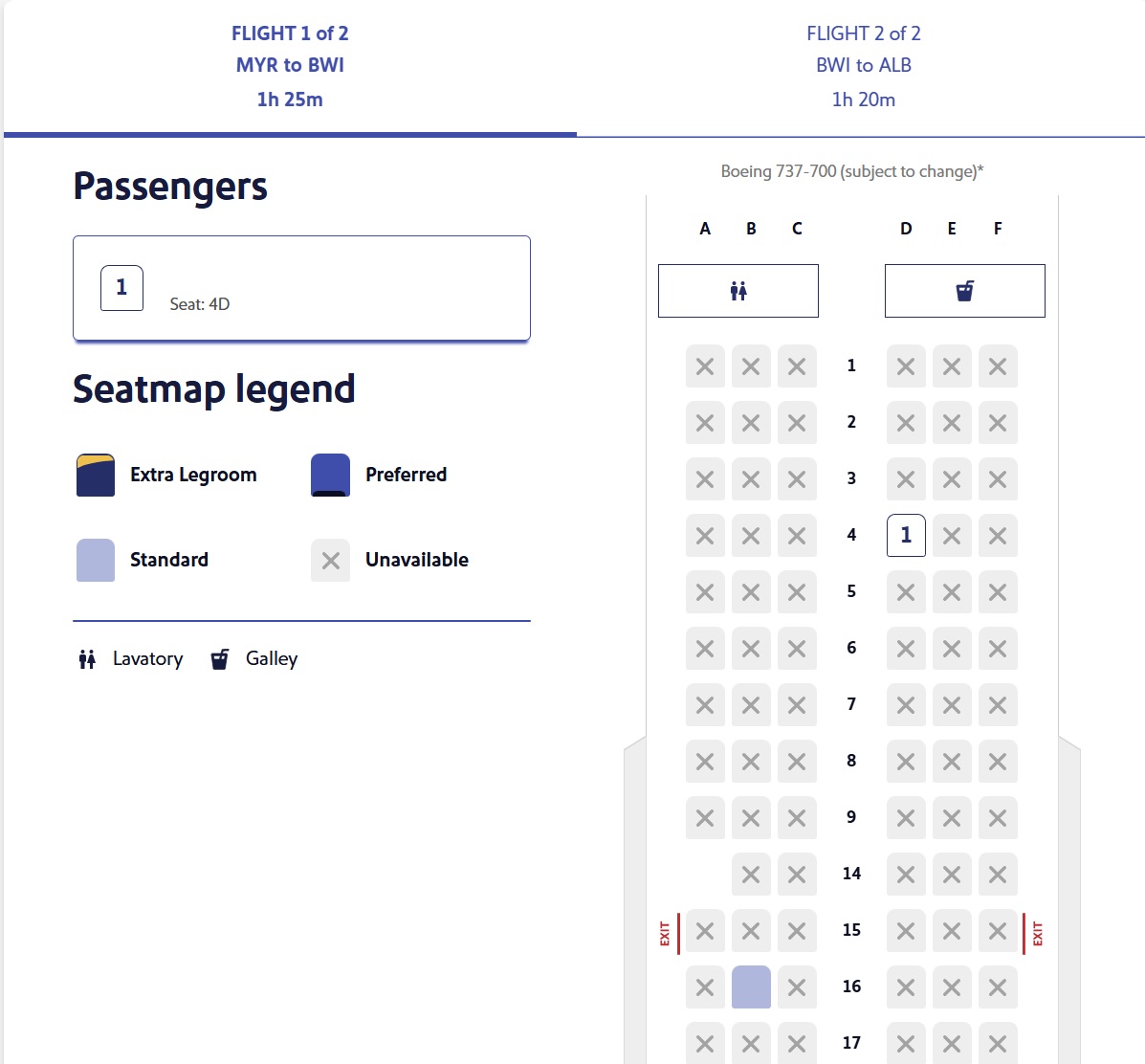
P4 (our 4 year old, who was booked under a Choice fare as a separate reservation) had gotten seat 4E at the 48-hour mark, and on Monday, he saw the same seat map as my wife — Seat 16B was available for him to select, though we obviously didn’t want to seat him in a middle seat 12 rows back.
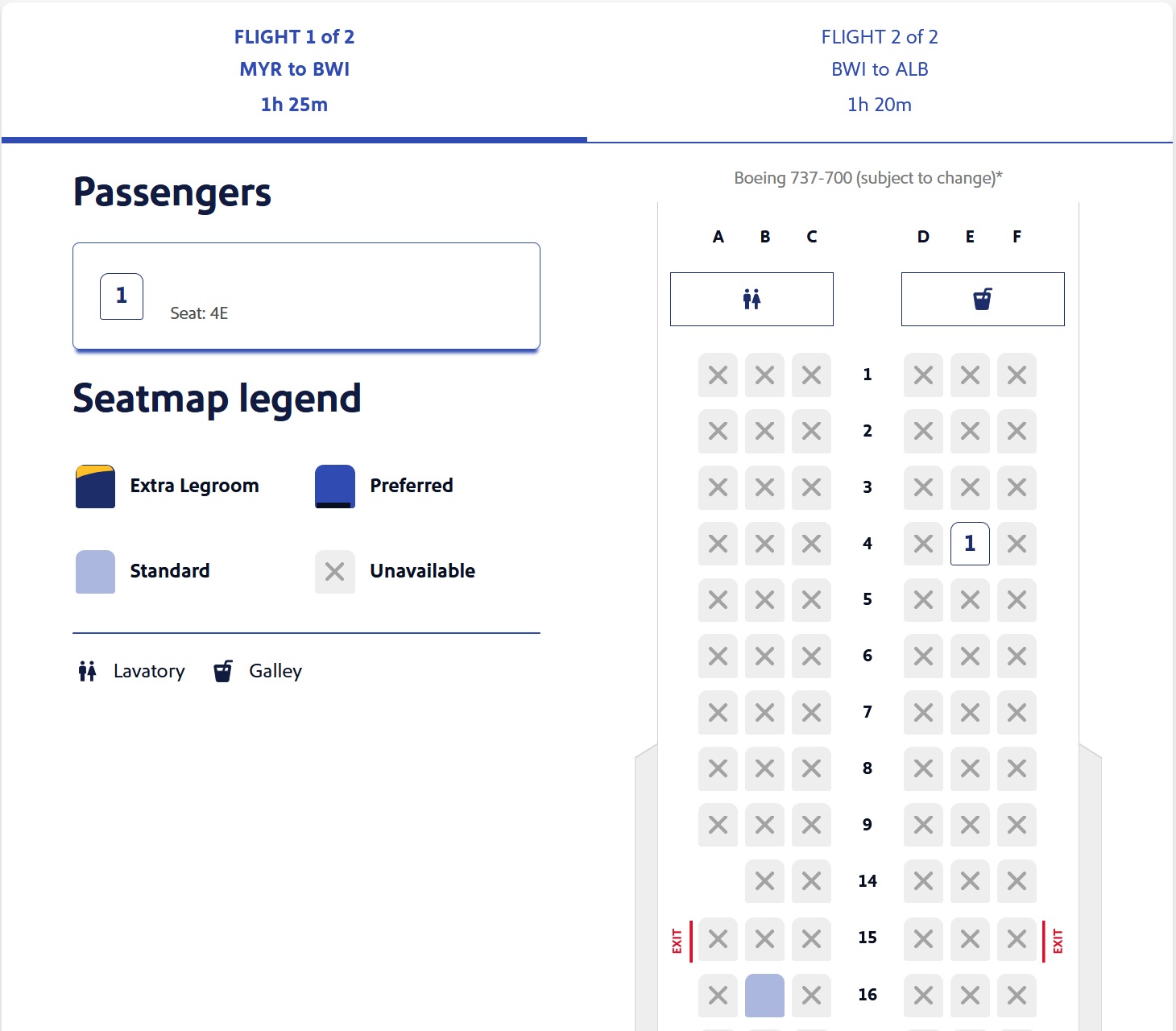
I point out the fact that P2 and P4 saw the same seat map as background, because P3, our 8-year-old son, saw a significantly different seat map at the same time.
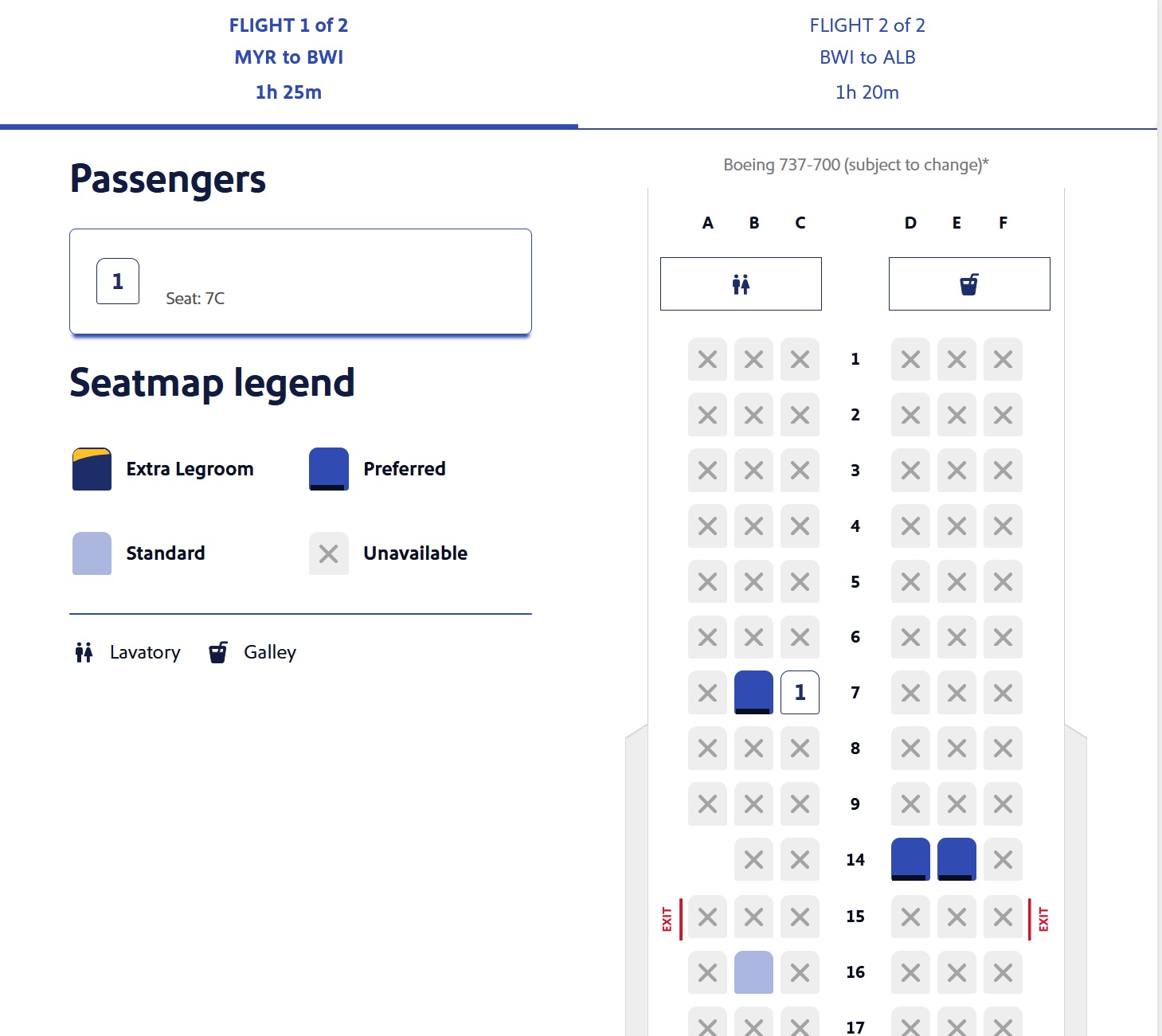
As you can see above, P3 was seated in seat 7C. On his seat map, the seat next to him (Seat 7B) was open and available to select! Additionally, seats 14 D&E were available. He also saw 16B available.
That was so weird! To review:
- P1 (Southwest Performance Business cardholder): Zero seats available for selection
- P2 (Southwest Rapid Rewards Priority cardholder): Only seat 16B available for selection
- P3 (Companion to P2): Seats 7B, 7C, 14D, 14E, and 16B all available for selection
- P4 (“Unaccompanied” minor booked on a Choice fare that is associated with P2): Only seat 16B available for selection
I have no idea why we didn’t see matching seat maps, and even less understanding why P3, who was P2’s Companion Pass Companion, saw more seats available for selection than P2, who is the cardholder.
That created a frustrating situation: the seat next to my 8-year-old son was open/available, but neither my wife nor I could see that seat as available to select! We similarly couldn’t see the Row 14 seats. Rows 7 and 14 would fall under “Preferred” seating, which should be available to either P1 or P2 by virtue of our credit cards. Neither row was an exit row.
Again, I pulled up the seat maps at the same time (and re-pulled them several times to make sure it wasn’t a matter of changing inventory). The seats that P3 saw were indeed selectable — he was originally assigned seat 7B, but I moved him to 7C on the aisle. I should also note that we were originally scheduled to fly on Sunday, and I had run into the same situation with seat maps not matching, but I hadn’t taken the same screenshots. When the same thing happened a second time this week, I was more diligent about saving pictures.
If there were any difference in the available seats we saw, I would have only expected that to apply to P4. Since he was on an entirely separate ticket, I hadn’t actually expected P2’s seating benefits to extend to him in the same way that they should apply for P3, her official Companion Pass companion.
Less than 12 hours prior to departure, seat 4F (in the same row with P2 and P4) became available, so P3 (who had been seated in 7C) was able to select that Extra Legroom seat free of charge. In other words, things ultimately worked out on the flight shown here. Somewhat annoyingly, I had to redo the check-in each time someone changed seat assignments, but that was the least annoying piece of the puzzle.
On the second leg we flew yesterday, we weren’t so lucky: we ended up with my 8-year-old assigned 7C again, and we once again saw different seating options with our different confirmation numbers. We were ultimately able to shuffle around with a kind passenger to get my wife and kids together on the second leg, but it was so strange that we didn’t see matching seat maps!
Not directly related, but I’ve also seen significant confusion regarding boarding groups. I really don’t understand how those groups get assigned. On the first leg, I was seated in 3C and was assigned Boarding Group 1, but the rest of my family was assigned Boarding Group 2. On the second leg of the trip, we were all assigned Boarding Group 2. I would take that to assume that perhaps the first 3 rows automatically get Boarding Group 1, but I saw someone in a Facebook group who reported being both an A-list member and seated in Row 3 who got Group 2 on a recent flight. I don’t know how boarding groups get determined. I do know that credit cardholders are supposed to get a boarding group no later than 5, but beyond that, it seems ambiguous.
Google Wallet users, beware that seat assignments won’t always carry through
Another oddity I noticed yesterday involved saving our boarding passes to my phone. As an Android user, airline apps/websites offer me the opportunity to save our boarding passes to Google Wallet (Apple users get the same functionality with Apple Wallet). I typically do this so that I’m not reliant on WiFi or a cell signal at the gate. In this case, it was even more important to me since we were all under separate PNRs, so I didn’t have the typical easy access to all four of our trips in my Southwest app.
However, as we got ready to board our second flight, I went to double-check our seats on our boarding passes. Unfortunately, I was quickly confused. My wife’s boarding pass in my Google Wallet included her seat assignment (6C on the second leg). You’ll see that reflected in the bottom right corner here under “Seat”.
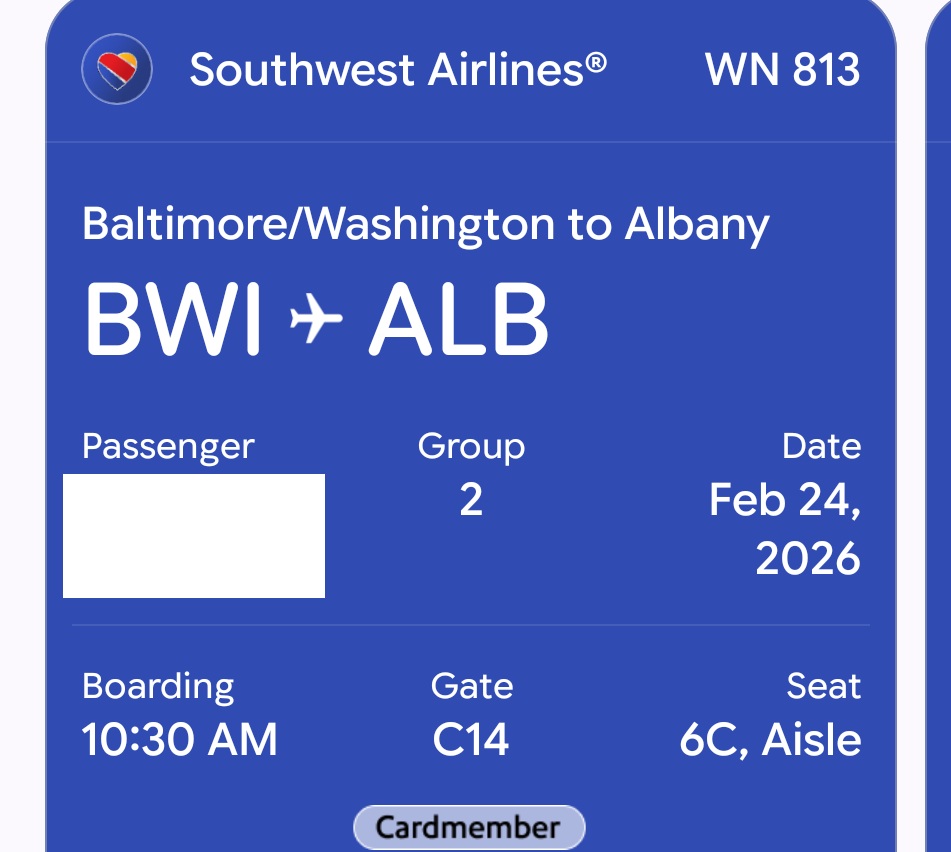
However, when I swiped to our sons’ boarding passes, theirs did not include the seat assignment on the boarding passes in Google Wallet. We had no trouble boarding the flight, but if I didn’t recall his seat assignment, I wouldn’t have found it in the boarding pass in Google Wallet.
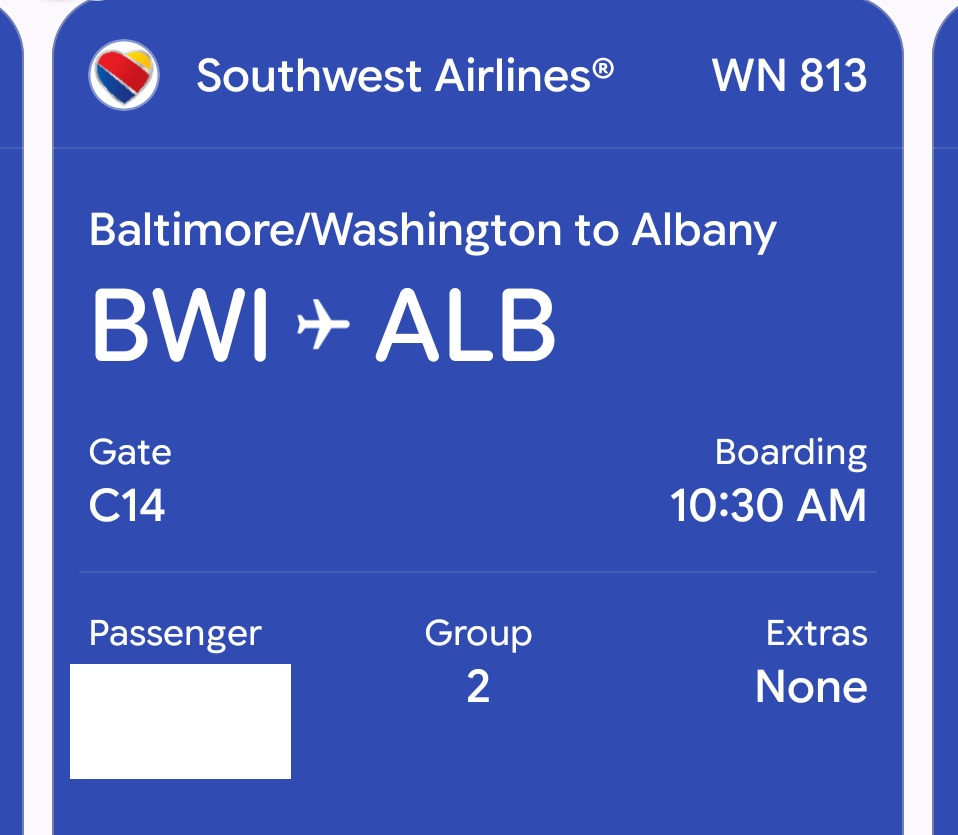
As an obsessive screenshot taker, I realized that I also had a screenshot of his boarding pass from the Southwest website. As you can see, the boarding pass from the Southwest site clearly reflected the seat assignment, but when I clicked the button to add to Google Wallet, the seat assignment didn’t come through on the boarding pass for this passenger (but it did come through on my boarding pass and on my wife’s).
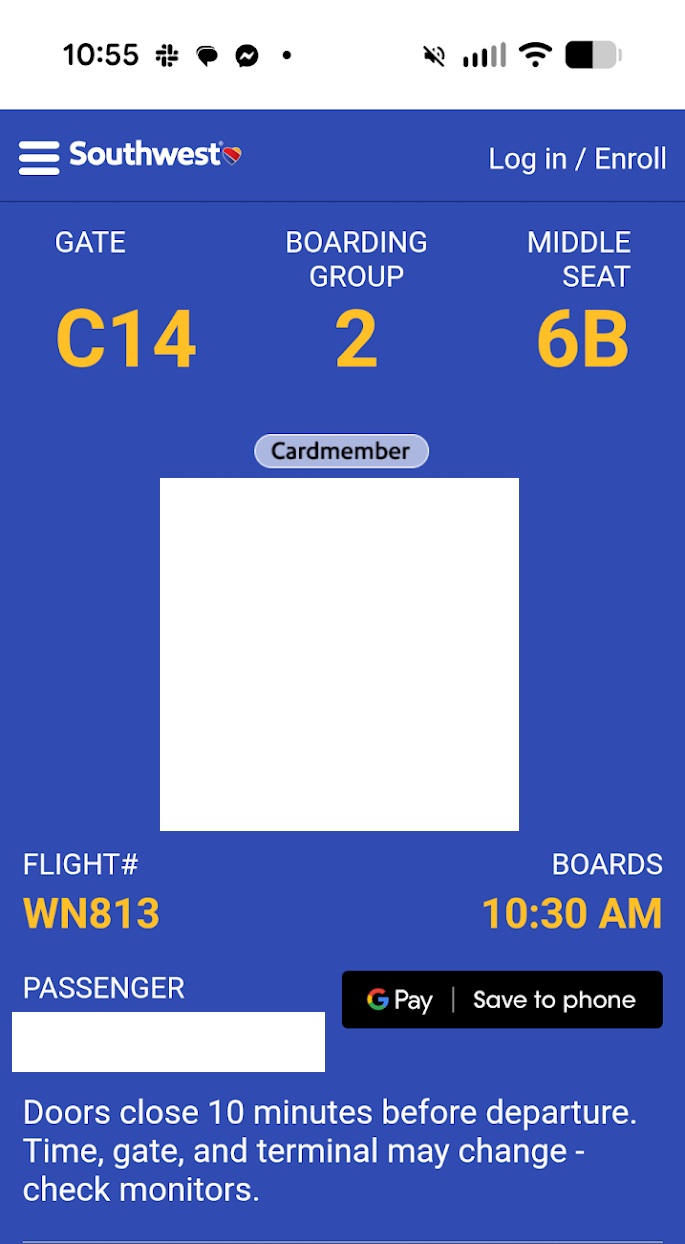
I don’t know why seat assignments didn’t come through for our kids. In our case, that wasn’t a huge deal as I knew where our seats were. However, I could see that causing some confusion for less experienced travelers.
The onboard experience was OK
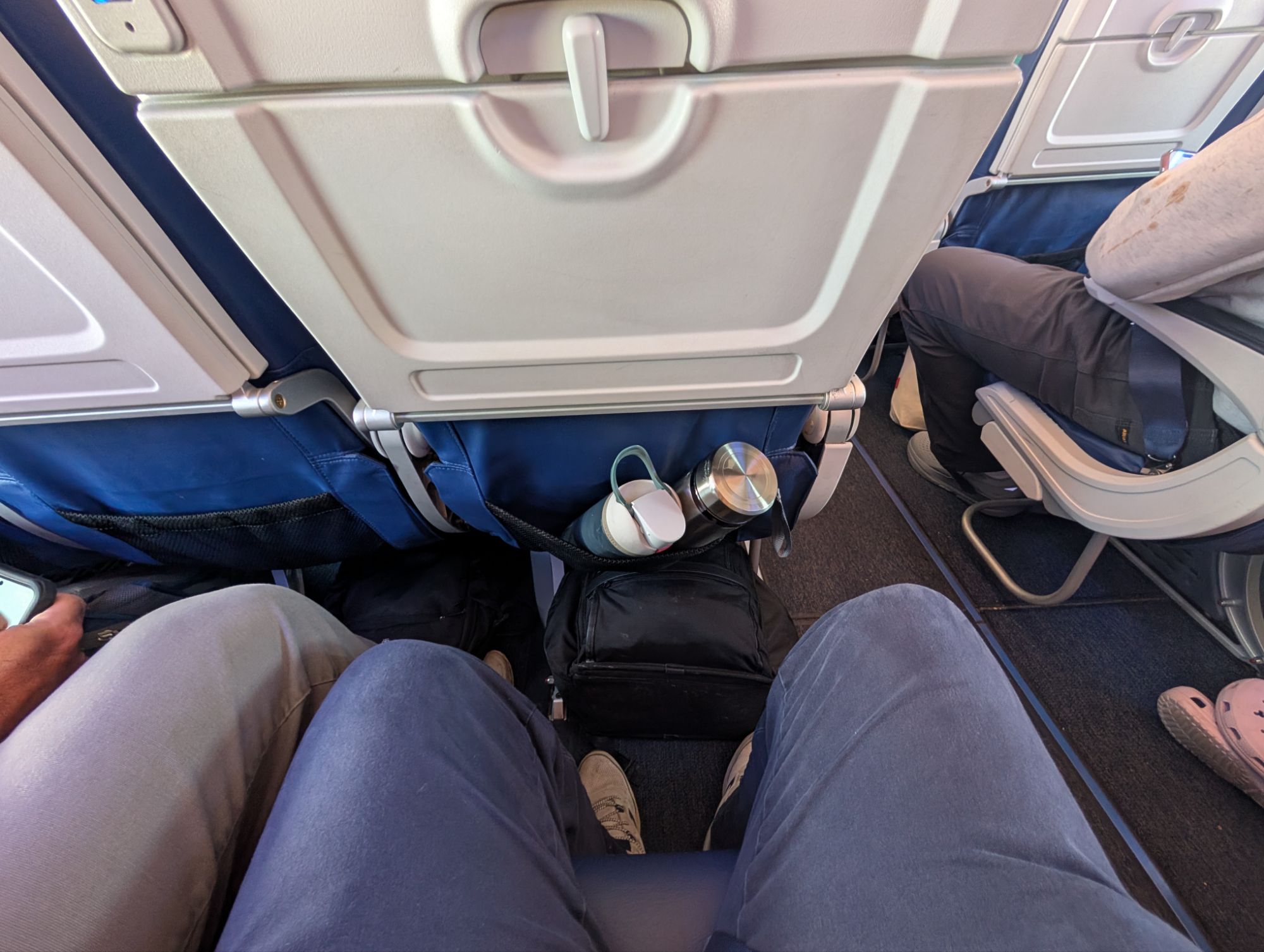
Once onboard, the experience was OK. The picture above shows the legroom, which was slightly more than usual. My kids and wife certainly found it to be sufficient.
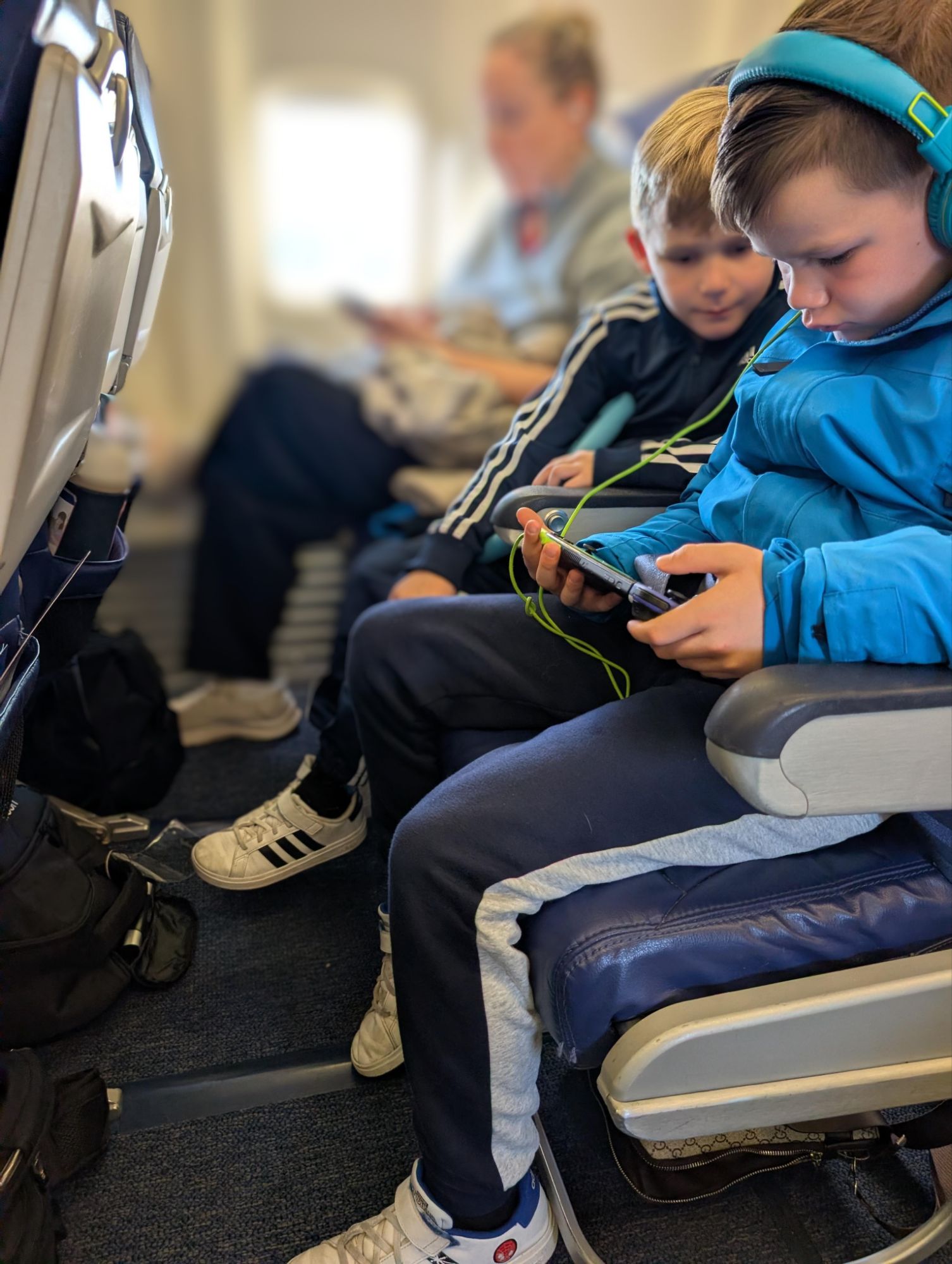
But the Southwest experience does still lag behind:
- There is no in-seat power
- There is no seatback entertainment
- The “extra” snack was either regular or honey-roasted pistachios
Having flown in a lot of JetBlue Even More Space seats during 25 for 25 last year, we all walked away saying that we much prefer the JetBlue experience. That said, Southwest covers far more destinations from our home airport, and with two Companion Passes in our household soon, we’ll surely be flying more Southwest in the next couple of years.
The free WiFi was certainly a nice addition.
Bottom line
We had our first experience with Southwest assigned seating, and it just wasn’t a very smooth experience. The most surprising thing is that four passengers under separate confirmation numbers saw at least 3 different seat maps, making it impossible for some of us to easily select adjacent seats. That was notably surprising since we should have had matching seat selection benefits. Combined with other annoyances like needing to redo check-in for a seat selection change and some boarding passes failing to carry over seat assignments to Google Wallet, it just felt like an experience that wasn’t as completely developed as I’d like more than after the launch of Extra Legroom seating. I’m sure that we’ll continue to take advantage of that cardholder benefit on many more flights once we have two Companion Passes in my household, but I hope we’ll have an easier time selecting seats together in the future.
 Want to learn more about miles and points? Subscribe to email updates or check out our podcast on your favorite podcast platform.



“After two hours on hold to get to an agent, the phone agent told me that my wife’s seating benefit should extend to P4 as a minor — and, sure enough, the agent was able to assign him the extra legroom seats next to my wife on both flights with no fee.” YMMV, I just called to try and get a minor to use the priority card member benefits and that did not work, the agent said it was not possible even though the reservations were linked.
Seriously, so many people incapable of understanding the basic problem: seat options not matching what they should be. Nick, I personally enjoy and value these long posts because so much in this game depends on details that you include. Consider including a TLDR at the end for those with attention spans of <2 minutes.
My experience with Southwest has been great. Apparently, you didn’t read the rules, which Southwest has been giving to customers and cardholders several times in the past few months. You said you booked 4 separate reservations for 4 people. I read that and knew you had made a mistake. Southwest allows you to book seats for up to 8 people, if you are on the same reservation and have a Southwest credit card. Next time, read and follow the rules instead of whining.
I’m with you George. That was a long-winded recap of the author’s experience with his seat selections. Everyone knows, or should know, you need to book on the same itinerary to make things kosher and flow smoothly. Sounds like he paid in frustration trying to game the system.
I flew last week and the plane was about 60% full. There were many empty seats and multiple empty rows towards the back of the plane yet a person who booked the basic was assigned the middle seat next to me on row 17 (first row behind the exit rows) I guess I understand they want to make a point to give those who purchase the cheapest flights the worst seats but when there are plenty of other available seats why punish those who paid for seat by sticking them in the middle of two higher paying customers. This person eventually moved seats, even though she was told by the flight attendant she couldn’t but it was disappointing at best.
I had a total of 4 flights last week with them. Only on one of them did the flight attendants seem happy. Several never made eye contact or even said hello. Moral seems to be low.
I’ve flown SW for years. About 10-12 times a year. Assigned seats, while not a huge turnoff, is a simple thing. Yet they can’t get it right. Have had to call the last three times to select a seat and then they just change it anyways. So, I’m now going to fly Delta for the rest of the year. Try it again in 2027. Maybe they will beta test before rolling out their next mess.
Sounds like you made things difficult on yourselves by not booking together in the first place.
Thank you for taking the time to tell us about your experience! Everyone is going to have a different experience and I don’t agree with the rude ones who basically say it was somehow your own fault. That’s just the way it worked out for y’all and I see there were several that also had the same issue of different maps at the same time. So again, thank you for taking time out from your family to write about your experience.
In the time it took you to orchestrate all those tickets, and then write about it, you could have gotten a job and worked and been able to simply pay for the tickets. It would have been far easier and less frustrating.
Not nice
From what I’ve seen/read and after excluding the whiners who think open seating and free bags will come back, Southwest definitely have seating issues. At times breaking up families, moving people who paid extra for better seating, etc.
They should be able to fix this and I’m not sure why it has taken so long but Southwest has never been known to be good with technology. I once had an interview (phone) with them regarding a technical job (I didn’t really have any interest in it but thought it would be interesting to talk with them) and lets say the process and questions were not up to par.
Of course, you seemed to make things even worse.
We’re flying Albany to Chicago tomorrow at 5:05am. I wonder if they’ll postpone the flight again after we arrive at the airport.
If this was a game to make your life as difficult as possible to try to have the world bend to your incompetence, you win hands down.
Why do you feel the need to be just utterly ugly? This is ridiculous.
Why even comment?
I fell asleep on the first page. Get a life, or fly american.
Seriously? He didn’t MAKE you read this. No need to be an a$&@!le!!
American?? NOT better.
You are a headache. I am sorry for any pax that has to sit with you, annoying obsessive compulsive family who puts up with you or not.
I’d self immolate if you started that rant up top i IRL conversation.
You and SWA deserve each other, and after ALL THAT you’ll be flying them more because “companion pass.” Dude, you’re the “stupid” they’re after, and not only did you bite, but you’re coming back for more.
This was HIS experience….and it is what it is. So many of y’all are just complete a$&!$les!!
What is WRONG with testing the system? Lots of good information and it does indicate that SW has something messed up if not all customers see the same open seats.
Go back to playing video games…
You have too much free time. Half hour read. Must have taken you at least four to six hours to write all this.
You could’ve stopped reading. Apparently you were interested.
Scrolled down FAST.
Please stop already. It just isn’t that complicated.
Well it WAS that complicated for him and his whole family. Just because this wasn’t YOUR experience doesn’t make it any less relevant.
Because he made it complicated