

We have heard reports from many readers in recent days that funds added to United TravelBank very recently are showing an expiration date of 1 year from the date they were added. We believe this to be a glitch, as the landing page for Travel Bank terms and conditions still indicates that TravelBank cash will expire 5 years from the date added, but it is worth being aware of and keeping an eye on this.
For those unfamiliar, United TravelBank functions like a stored gift card balance that can be used to book United flights directly with United. The funds added get pooled together and can be used on a single transaction, and they have historically expired 5 years from date of purchase, which can be a convenient way of banking credits for future use.
I added money to my own United TravelBank last night. Just as it has for others recently, that newly-added TravelBank funds show an expiration date of 1 year from the date added (1/25/27).
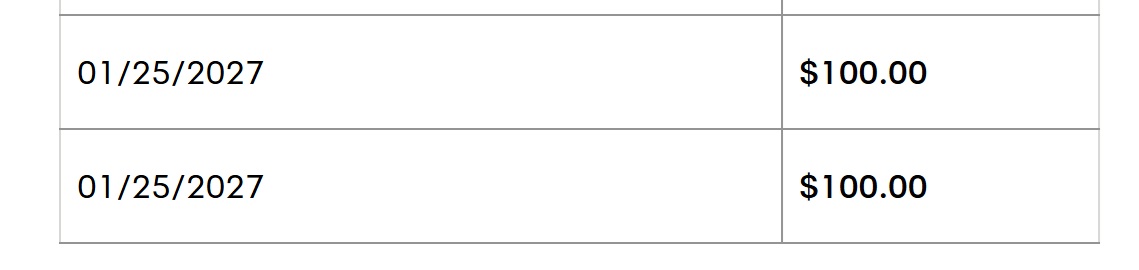
We don’t expect that this is intentional since the graphic under “Expiration” (screenshot shown above) still clearly notes that TravelBank cash expires 5 years from date of deposit. Doctor of Credit reports that people are being told by support that this is a glitch, so I wouldn’t worry much about this unless it persists this way for a month or two. I assume that this will be fixed, though we’ll keep an eye on it.
 Want to learn more about miles and points? Subscribe to email updates or check out our podcast on your favorite podcast platform.



Text chat with United rep, shared screenshots, and rep confirmed that this was a glitch and sent me my actual expiration dates of 4 to 5 years in the future. Save your screenshots, funds can be accessed if expired through calling apparently…..
Hi, here is what I just noticed… although the travel bank itself showing all transactions (even the old ones) with the expiration date within 1 year, I checked the “My United” homepage, and it displays some summary info there. There is a small square Travel Bank section under My Wallet, and it shows there 2 transactions which are expiring the earliest… and there it shows correct dates (in my case they are in 2028). So, it does seem like a display glitch after all. Please check yours and let us know what do you see there.
I see exactly what you saw there—the correct expiration date.
But when I clicked that active link, a list of credits with incorrect expiration dates appeared.
United on X just confirmed it to me in a DM:
Two weeks ago I had $2400 in credits with expiration dates of 2030 and 2031. Today it shows all the credits expiring on various dates this year. I messaged United on Twitter, and they sent back a screenshot of what they were seeing with all correct expiration dates in 2030 and 2031. So the glitch seems to only be in what we’re seeing through OUR views on the website, not the way United sees them. The Twitter team confirmed the glitch and said to contact the Mileage Plus service center for more info, which I haven’t yet done
Let us know what they say if you do contact them please.
If the travel bank purchase is a credit card benefit (i.e. AMEX travel credit), it expires in a year.
I have the closest one showing as expiring 1/31/26. I’m curious what’s going to happen, but I’m not convinced this is just a visual glitch.
I don’t think they could/would just change the terms of Travel Bank without noting that anywhere and while continuing to advertise it as not expiring for 5 years. There’s clearly a technical problem going on.
That said, I don’t know what kind of a headache it’s going to be getting it fixed.
In my own case, I have two $100 credits showing as scheduled to expire next week (that I purchased a year ago). I booked a flight last night in part to see what it would use, and it did not use those ones “scheduled” to expire next week. I don’t know whether that’s because United knows behind the scenes that those should be valid for another 4 years or whether it’s starting with the most newly purchased ones, or whether it’s all part of a sinister plan, but I don’t think it’s that last one.
Unfortunately, it only shows like 10 credits at a time in my account, and I have more than that, so I can’t even see all of the expiration dates listed right now. And I can’t tell for sure which ones it used.
It’s definitely a headache and I don’t know how it’s going to be resolved yet.
The line that was showing incorrect expiration date of 1/31 is gone, but the total balance did not change as of 2/1. Aside from the inability to see the upcoming expiration dates, so far I’m not seeing any specific issues.
When I try to log in to
Add cash , it says “your offer has ended “. I cannot get in
New travel bank purchases this year have one year expiration but also old ones expiration dates were changed to one year all of sudden. What is worse is that when I purchased a ticket with my travelbank recently it used the ones that should expire in 4 years but left the one that was expirig later this year according to the correct expiration dates. So maybe it is not a glitch or if it is, it certainly affected the balance in a significant way if you have different expirations
I used my platinum incidentals credit to fund travel bank on 1/13 and 1/18. I’m seeing conflicting information in my account. The two transactions show a 1 year expiration when I look at the details, however in the summary it shows $100 expiring five years from now.
TRAVELBANK Summary $200.00
$100.00 expire 01/13/2031
Expiry details
TravelBank cash expiring soon
Date Amount
01/13/2027Expiring January 13, 2027 $ 100 dollars $100.00
01/18/2027Expiring January 18, 2027 $ 100 dollars $100.00
Purchased TravelBank via Sapphire Reserve on the 19th and seeing it has the expiry for Jan 19, 2027 — seems to have been going on for a while
Mine $200 travel bank newly purchased expires on 4/13/2026 !!
$25 credit from IHG Premier deposited on 12/1/2025 already expired on 1/16/2026 and is no longer available.
The IHG credit deposited on 1/8/2026 expires on 1/8/2027.
.
Nick, I hope it’s a glitch, as it seems worse than just recent additions having a one year expiration. Funds I added last year now have a 2026 exp date.
Here is another data point: I bought $100 yesterday. It shows as expiring 1 year from now. Previously purchased funds don’t show up expiring before the amount purchased yesterday.