

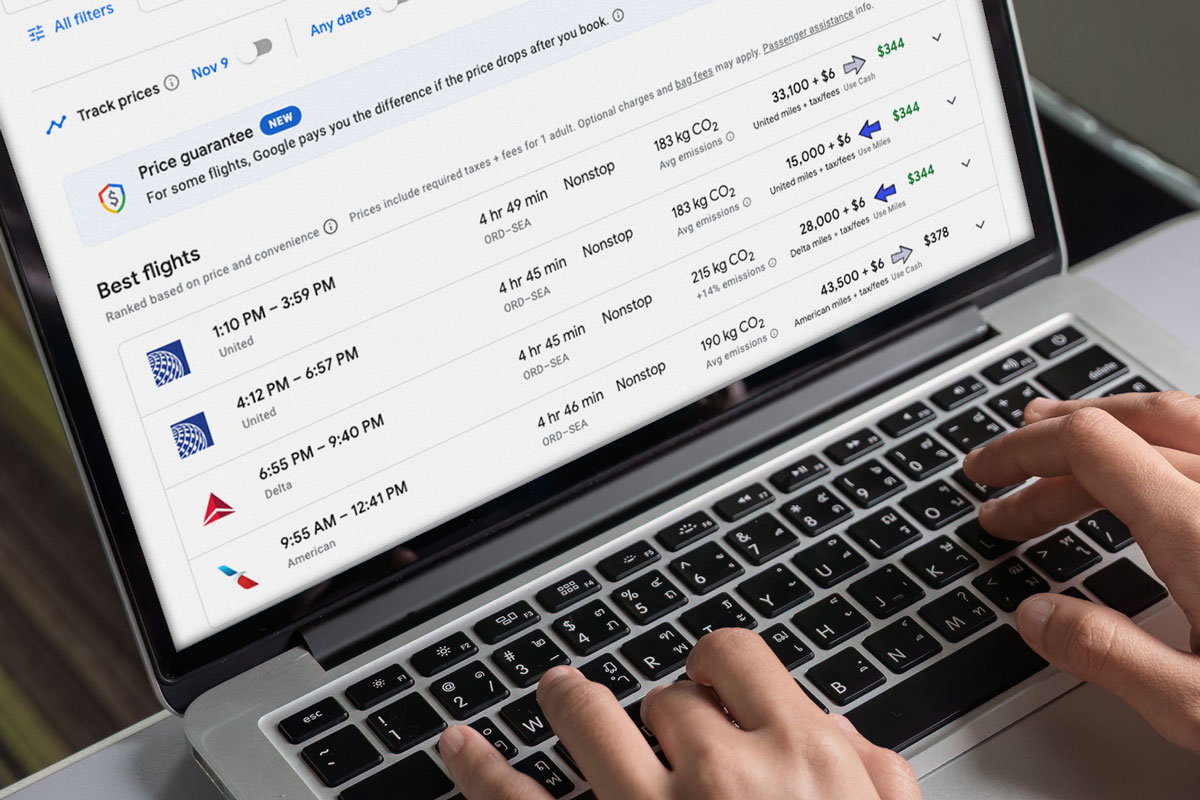
Points Path is a browser plug-in that automatically integrates with Google Flights. When you run a Google Flights search, Points Path automatically inserts point prices into the results next to cash rates and shows you whether it thinks you’d be better off paying with points or cash.
I like this tool because I never have to think about it! I use Google Flights all the time and, thanks to Points Path, I find great award prices every now and then, even when I hadn’t planned to look for them.
Overview:
- Points Path is a browser extension that inserts award search results into Google Flight searches. Point prices appear next to cash prices, along with a Points Path indicator that shows which is the better deal.
- Supported browsers: Google Chrome, Microsoft Edge, Safari, iPhone Safari.
- Supported airline programs:
- Free Version: Alaska, American, Delta, JetBlue, Spirit, United
- Pro Version: Alaska, American, Delta, JetBlue, Spirit, United, Aer Lingus, Air Canada, Air France/KLM, Avianca, Emirates, Etihad, Qantas, Qatar, TAP Air Portugal, Virgin Atlantic, Virgin Australia
- Pro Features:
- Price tracking alerts
- 7-day points calendar
- Delta Amex 15% mileage pricing (i.e., if you tell it that you have a qualifying Delta credit card, Points Path will automatically show Delta point prices after the 15% discount)
- United credit card discount pricing
- User-adjustable point valuations
- Lufthansa First Class dashboard
- Dollar Flight Club Premium+ access (6 month free trial for new members)
- HotelSlash free trial membership (12 month subscription & up to $30 off first prepaid booking of $150+)
- Pro Price:
- $79.99 per year (Get 15% off your first year with code “FM15” entered at checkout)
- $7.99 per month (Get 3 months for the price of 2 with code “FM3“)
- Link to sign up for Points Path Pro: pointspath.com/fmoffer
- Disclosure: Frequent Miler will earn a commission if you sign up for Points Path Pro through the above link
The Points Path connection to Frequent Miler

Long-time readers may remember a Frequent Miler series called “Bet you didn’t know,” written by “Devil’s Advocate,” AKA Julian Kheel. Julian was an awesome part-time contributor to Frequent Miler (and I miss that series!). But when he was ready to go full-time, he moved on to The Points Guy, then to CNN Underscored. And now, he’s on his own with his Points Path business. We wish him the best of luck!
Here are some links if you’re interested in diving into the “Bet you didn’t know” history:
- Introduction post: Devil’s Advocate stolen and unmasked
- Bet you didn’t know series
 Want to learn more about miles and points? Subscribe to email updates or check out our podcast on your favorite podcast platform.



The adjusted price for United cardholders seems to work for the main search function, but it is a little goofy in a couple other ways. If you click thru on a flight, it will show the correctly-reduced miles in the top section but uses the regular miles in the lower section; and the CPP calculations are based off the regular miles rather than the reduced miles. Likewise, if you select to track the flight, it will default the target to the regular miles rather than the reduced miles. I can change the target miles, but I am unsure if it is tracking off the regular miles or the reduced miles, though my hunch is the regular miles.
Also, paying for the monthly subscription for Points Path with the US Bank Triple Cash has been qualifying for the $100 software credit payment (pay for 11 consecutive months, get a $100 statement credit).
Would like to hear from Julian on whether the alerts work off the regular miles or the reduced miles. That’s a pretty important selling point.
Hey folks! Thanks for flagging these issues. Our team is looking at them right now and we should have things straightened out in the next few days. The intention is for users to be able to track based on their chosen setting — either United regular or United card — but it looks like a bug or two may have slipped through when we implemented it. I’ll circle back around here with an update once it’s solved.
@Greg: In the interests of full disclosure, and to avoid wasting your readers’ time, you should add to your article that the offer code doesn’t work if you have ever used this thing before.
Hello — Julian here from Points Path. The code should work so long as you haven’t had a paid Points Path account before. It’s meant as an introductory offer, and is restricted only to prevent people from daisy chaining multiple discounted offers together over a period of years. But you should be able to use it if you’ve only had a free account. If that’s the case, head to our website and click the envelope icon in the top right corner to send us a message, and we’ll get it straightened out for you.
The envelope icon does nothing. -:(
Weird, I just tried it and it worked fine on several of my devices. But you can email at mailbox at pointspath dot com.
sent.
FM15 does not work. If you had a free account, the so-called offer does not work.
Subscribe to Points Path Pro
US$23.97
Points Path Pro – 3 months
US$23.97
Get advanced Points Path features including price tracking, 7-day points calendar searches, and more.
Billed monthly at $7.99 from Aug 12, 2026
Subtotal
US$23.97
This promotion code cannot be redeemed because the associated customer has prior transactions.
Apply
Tax
US$0.00
Total due today
US$23.97
Where is this offer on the link? Broken?
Overall,I like the Points Path tool but it always seems to log out of my account on its own on Chrome. It’s a pain to have to keep logging in all the time, unlike other extensions like CardPointers. So I would have to disagree with the “set it and forget it” part of Paths Path due to this issue.
I use FIREFOX. Is there a chance that one day the extension will work on that browser? It is, *to my mind* the most secure browser out there and the one I far prefer using.
Don’t see the extension for safari. Link?
It wasn’t very obvious on the Points Path site either but I found it under the FAQ: For Safari users: Click here to find Points Path in the Apple App Store, then click “Get” and “Install.”
Thanks for that.
As of Wed 25Jun a reviewer says it still doesn’t work with Safari, but I just installed it and it seems to work fine.
Reviews are terrible (all 2 of them), but both are based on the extension not running on Safari. Seems pretty good to me, with one quick search.
Hey folks! Julian here from Points Path. Appreciate these comments. Those two reviewers on the Apple listing apparently were misinformed by an outdated message on our website, which has since been updated. However, as you noted, yes, the extension works fine on Safari, and we’ve replied to those reviews with the correct info.
Anyone who’s looking for the Safari version can find it by searching the Apple App Store, or by going to the Points Path site and clicking the “Download the free extension” button. Our system will automatically detect what browser you’re running and send you to the correct extension install page.
You mean the big button right in the center of the home page? I was looking at every menu item at the top and bottom and completely missed the button in the center of the screen.
I will say that I searched the Apple store and did not get a hit on the app, only found it using Steve’s link that he posted yesterday. I’m going to guess there’s not much you can do about that, but if there is….
I, too, failed to see it on your website. I know it’s redundant, but there may be value to putting the link in several different places, just for those of us who miss the glaringly obvious.
All that said, I’ve run a number of searches today and am quite pleased with the functionality.
I recently subscribed to the pro version. If one has a Chase United credit card, in the United website opens more United redemption options and many times with a big discount like 50%.
These do not display in Points Path Pro. Any suggestions?
No, I’m not aware of any website other than United’s that would show you that
It would be nice to have the option to add the expanded award availability due to credit card, do you if any tool support this?
That would be nice. I’m not aware of any tools that do that
How is it added as a Google Flights extension?
Simply install the browser extension and then Points Path automatically appears in your Google Flight searches
I have tried to ad extension and not getting anywhere keeps says to dl Chrome when I already have Chrome, I even tried to install again getting nowwhere..help
I have also tried multiple times and get nowhere.
Hi Laurie. If you’re having issues that aren’t resolved by my comment above, email us at mailbox@pointspath.com and we’ll be happy to help.
Hi Barbara. Julian here from Points Path. The issue you describe usually happens when you have a browser other than Chrome set as your default browser. You just need to open Chrome first, then copy and paste the install link over. If you need further help, email us at mailbox@pointspath.com and we’ll be happy to assist.
Does it work on Safari?
Not yet, but we’re working on it. 😉
I use Firefox exclusively. Hoping you set up for that browser one day.
Yep, I’m with you, Carl. It’s definitely on our to-do list.
The tool looks great, but I noticed while searching for one way business class award tickets from SEA to HKG for aeroplan rewards it showed flights on various partners (asiana for ex) with all the segments in business or first. However when following the link to aeroplan, only the shortest segment was in business class with the TPAC flight in economy. So there seems to be an issue reading the available class on all segments, at least on the flights I looked at.
Hi Tim. Thanks for this note. You are correct — the issue is that Aeroplan sometimes classifies entire awards as “business” class when only a small portion of them are. I’m prioritizing a fix to filter those out so that we solve that issue going forward.
[…] Google Flights, with the Points Path browser extension, I quickly found that AA flights were widely available on Wednesday for 13K one-way economy or 25K […]
i think this should be rated higher. So far its the only one ive found that includes both united and hawaiian for free, two airlines im especially inerested in. it recommends between using cash and points, which i do not find to be useful. Even a cheap flight like sfo to maui for $100/pp/each way. I would rather get the credit card and save $400. i always use points. it integrates with the legroom chrome extention, but i havent figured out how that really helps much. lack of a real points based calander view is a disadvantage. does a nice job showing transfer partners and alternative booking options.
ps i think points.me has both those airlines for a cost.