

Gondola is a free tool designed to make it easy to find hotels that offer the best value for your points or for cash. In the short time I’ve spent with it, it has already become my go-to tool for hotel trip-planning. I love that it not only shows cents per point for each hotel in its search results, but also lets you sort by point value (not just by point price or cents per point, like other tools). When you click into a hotel, Gondola shows a wealth of really useful information to help you decide whether to book it. And, best of all, Gondola promises to alert you if any stays you booked drop in price (via cash or points), regardless of whether you booked them through Gondola.
Overview
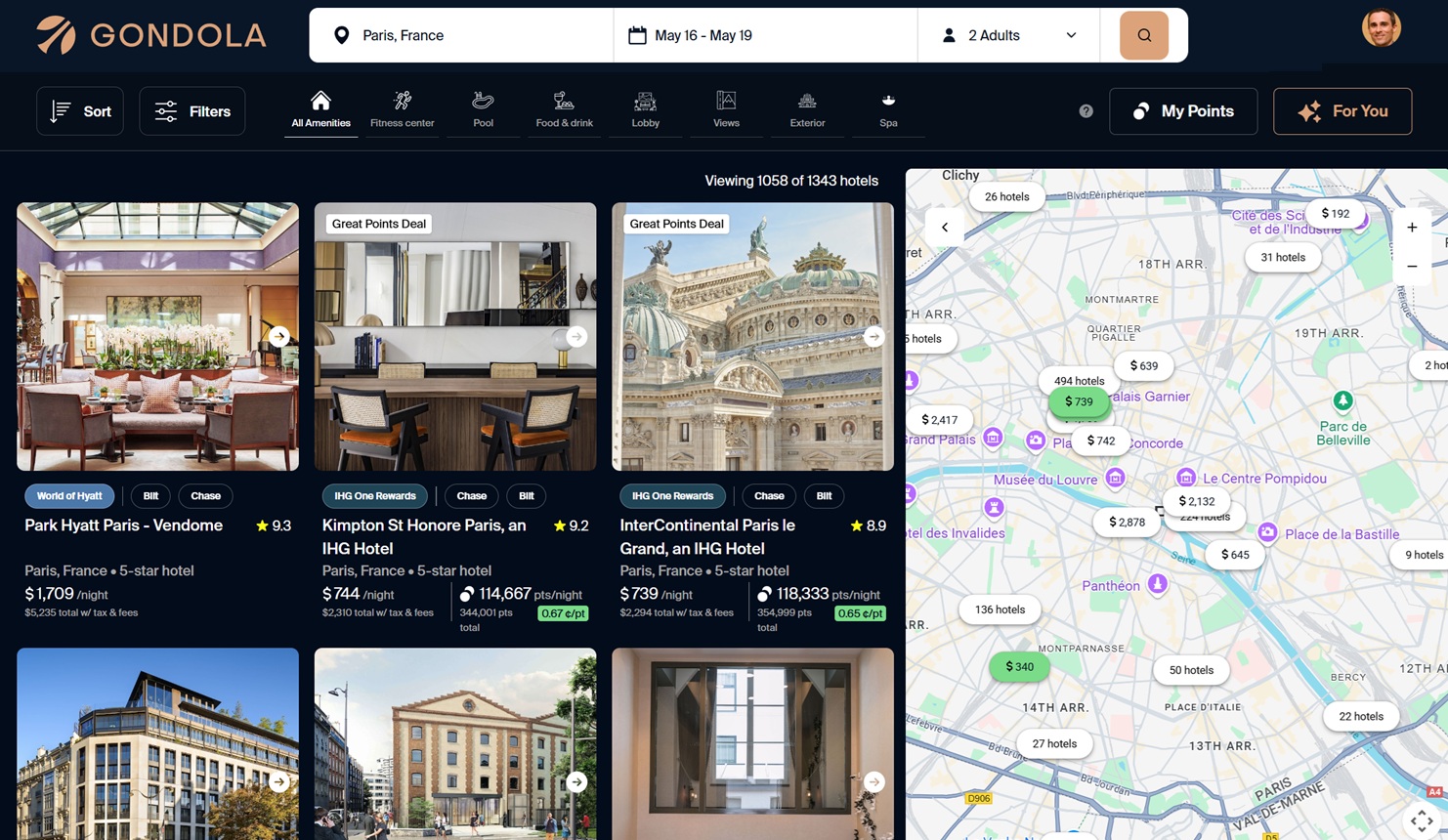
At its core, Gondola is a useful hotel search tool. When you search for hotels, Gondola shows prices in both cash and points, along with Google review scores. For points bookings, it also shows cents per point and whether or not that’s a good value. When you click into a specific hotel, the tool offers an incredible amount of information, including the typical cash price and point price ranges for this hotel; benefits you can expect based on your elite status; user reviews; hotel policies; and fees (including resort fees, if any).
Gondola is designed to give you personalized recommendations and information. If you grant it access to the email address you use for all your loyalty accounts, it automatically determines your current point balance and elite status for each program. Further, it catalogs all your past and future trips (at least those already booked). Gondola is able to use this information when recommending hotels. For example, if you have a history of staying in a particular hotel brand, it may be more likely to recommend that same brand in new cities. Or if two hotels are equal in other ways, Gondola might first suggest the one where you have elite status. Gondola also offers an AI-driven Explore feature, which lets you find hotels based on open-ended queries. And, of course, the AI can use what the tool knows about you to make better recommendations. Gondola also uses your information to alert you to hotel price drops, even if you didn’t book the stay through Gondola.
The email problem
When signing up for Gondola, the site asks you to give it access to your Google or Microsoft email account. Many tools do this just for authentication, and I think that’s great. The problem here is that it needs you to authorize it to read your emails. It does this to learn about your loyalty memberships and past trips so it can make personalized hotel recommendations.
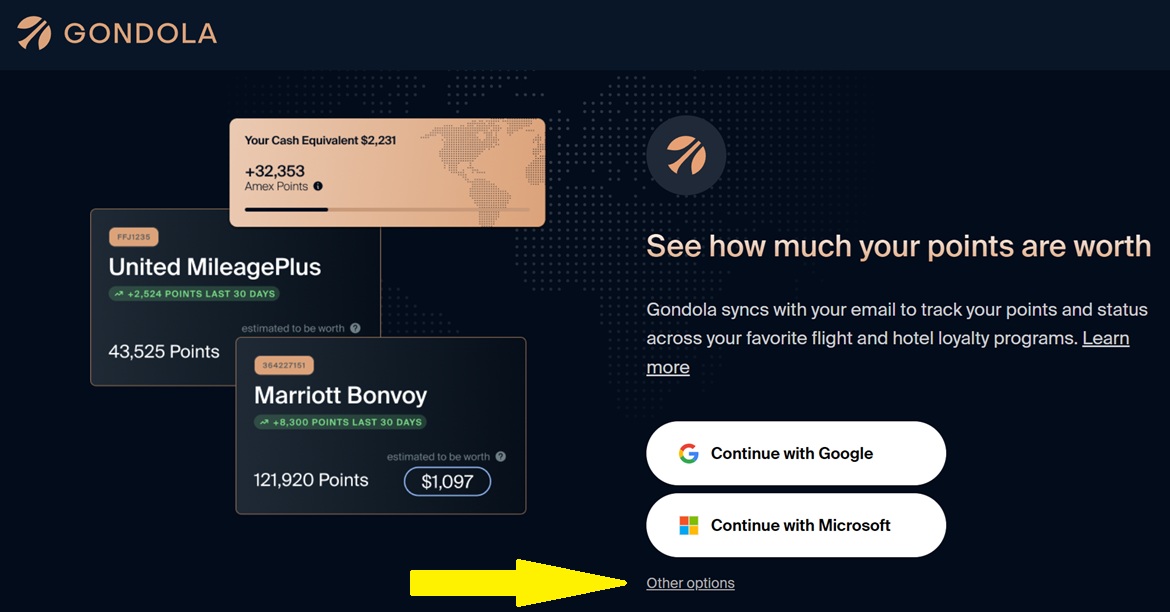
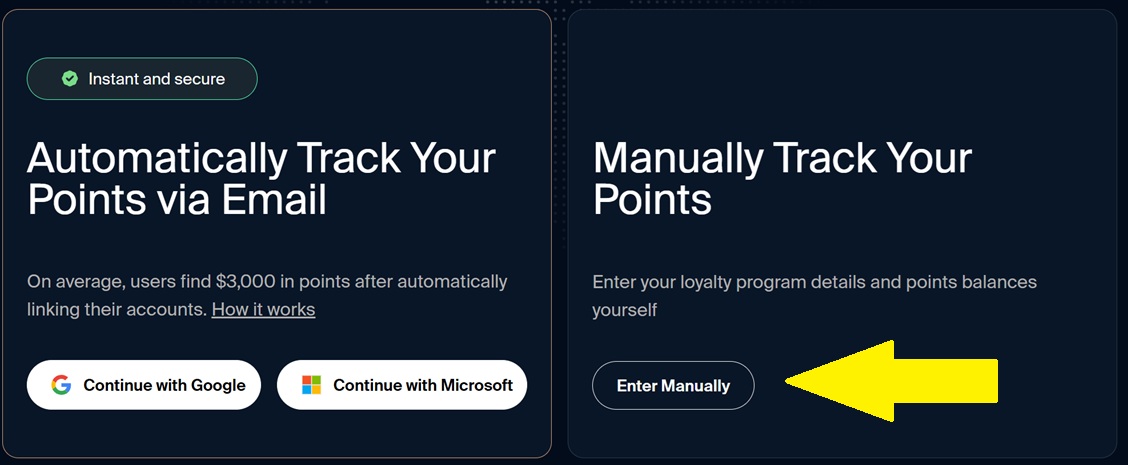
Fortunately, Gondola no longer requires access to your inbox. When signing up, you’ll see a screen asking you to “Continue with Google” or “Continue with Microsoft” so Gondola can sync with your email. If you don’t want to allow that, click “Other Options”. Then you’ll have the option to track points manually.
Gondola “cash back”
When you make cash bookings, you’ll earn Gondola Cash Back (which can be used towards future bookings). Unlike most other online travel agencies, these reservations are booked directly with the hotel, so that you can manage your stay directly with the hotel chain, and you can earn hotel points and elite credits.
The thing I don’t like about Gondola “cash back” is that it can only be used for future bookings. Personally, I’d prefer to find a portal that offers points or real cash back and click through there to the specific hotel chain to book my stay. As long as you don’t book through an online travel agency, you’ll still earn your hotel points and elite credits that way.
Price drop alerts
Gondola uses its email integration to monitor the trips you book (even if you book outside of Gondola) and to watch for price drops. You should get alerted if the cash rate or point price drops from the amount you paid. You can then rebook the stay for less.
I have not had a chance to test this feature yet, but it would be fantastic if it works well. I’m hoping that they’ll offer a way to forward hotel booking emails to Gondola for those who don’t want Gondola to scrape their inbox.
No availability alerts
Other hotel award search tools let you set up alerts so that you’ll be notified when a hotel you’re interested in becomes available to book with points. Gondola doesn’t do that. My approach is to search for currently available hotels through Gondola, but to switch to another tool like Rooms.aero to set alerts for hotels that I want to watch for availability.
Why this tool is worth a look
Point Value
Gondola is the only tool I know of that lets me sort hotel results by point value. Awayz lets me sort by points, and PointsYeah lets me sort by cents per point, but neither is particularly helpful when comparing hotels across multiple award programs. Hilton points, Marriott points, Hyatt points, etc., are on different scales. Sorting by points or even by cents per point doesn’t make sense when comparing these programs. Imagine, for example, if Hilton reported their cash costs in number of pennies, Marriott in nickels, and Hyatt in quarters. Then, if a tool lets you sort by the number of coins each hotel costs, Hyatt is going to come out on top every time as the cheapest (as in requiring the fewest coins), even though it may be more expensive when you convert each hotel’s cost to dollars.
When sorting hotels in Gondola by point value, Gondola uses its point-value estimates to compare apples to apples. And while their point values may not match my own, they’re far better than simply using the point-cost for sorting. The hotels that rank at the top are the ones that offer the best value for my points.
Detailed Information
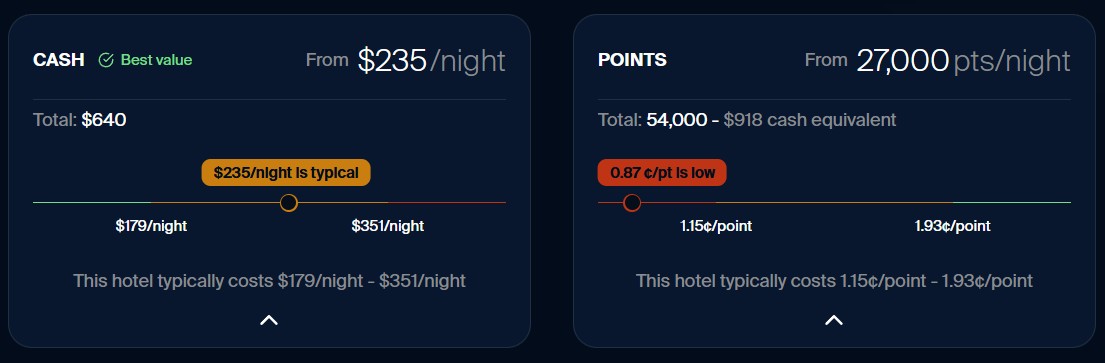
When clicking into a specific hotel, Gondola shows a wealth of information that I find really useful. One example is that they show a chart of the typical cash-and-cents-per-point ranges they’ve found at this hotel. This way, at a glance, you can see if you’d be getting a good deal compared to usual prices for this hotel:
Flight AutoSave
Gondola recently launched its new Flight AutoSave feature. This monitors eligible flight reservations after booking and automatically reprices them when fares drop, allowing travelers to receive the difference as an airline credit without having to track prices themselves.
Gondola currently supports automatic repricing on eligible flights from United, Delta, American, and Alaska, and provides fare-drop alerts for some other airlines. It’s completely free to use for all Gondola users, so travelers keep the full value of any savings or flight credits.
How to sign up
1) Use your Google or Microsoft account to log in
1A) Click here to sign up for Gondola (Disclosure: Frequent Miler will earn a commission on paid bookings if you sign up through this link)
1B) Log in with your Google or Microsoft account. This step does NOT give Gondola access to your emails.
2) Choose whether to allow Gondola to access your emails
On the next screen, you’ll be asked again to choose to continue with Google or Microsoft. In this step, Gondola is requesting permission to access your emails. If you don’t want to give Gondola access to your emails, click “Other options“:
If you choose another option, you can click “Enter Manually” as shown below. Hopefully, there will be additional options in the future.
 Want to learn more about miles and points? Subscribe to email updates or check out our podcast on your favorite podcast platform.



Perhaps the autosave for flights will be more useful than for hotels because it does not need to cancel the original booking. For hotels, because most of my hotel bookings are through portals such as FHR, cancelling and rebooking isn’t an option.
Hey Greg, thank you for the update. I signed up for Gondola and sent over a few of my upcoming flights to see if their flight autosave tool can find and rebook me on a cheaper flight.
Not sure if anyone else is having this issue, but I read Greg’s instructions 3x and when I click on “Enter Manually” I get a “Failed to Sync Email” error. I have tried chrome and edge on desktop. Chrome is the only one that even gives the “other options” button to click(same issue on ipad).
Update, it appears logging out and back in with Gmail(no permissions) did the trick!
It will not let me sign up without allowing access to my emails. There is no way to opt out. So I won’t be signing up. I’m sorry but they are making this way way too complicated and invasive. Somebody was promoting gondola on tiktok, same issues in the comments. Too invasive
Please carefully read the “ How to sign up” section of this post. You do have to sign up with your Google or Microsoft account but before giving Gondola access to your email you’ll see the “other options” link.
I don’t see the option of “Other Options” when going thru the sign up page…
Please carefully read the “ How to sign up” section of this post. You do have to sign up with your Google or Microsoft account but before giving Gondola access to your email you’ll see the “other options” link.
Thanks so much for taking the time to reply. I was just going thru the “Email problem” section instead of “How to sign up” section so missed that I will need to sign up with one of those account, but not giving them access to the email…Thanks again!
I am not seeing any option to sort the results at all.
Edit: Just realized you cannot sort when choosing flexible dates. But it works when choosing fixed dates.
I just signed up. Gondola gave me the option to create a new gmail account, which I did. I did have to verify my phone number. My Google Voice # could not be used for verification, only my mobile number worked. I manually entered all my hotel accounts. In trying it out there were a few instances where hotels appeared to be available for my dates, but when I tried to book the hotel, once I was connected to the actual hotel program, (that seems embedded within the Gondola website), only then did I see that rooms were not available for my dates. But, so far just playing around with it for maybe 15 minutes, I generally am finding it useful. This does seem like a pretty robust hotel award search tool with a few unique features. The only other website that seems to be close in it’s search and features is the paid version of the Daily Drop Pro.
Seems as though they have removed the option to sign up without email again – other options is now showing
It still looks buggy. I was trying to test out manual addition of an airline program (Qatar), but the drop-down won’t scroll past what is showing on the screen (Stops at M). I’ve been using a g-sheet for years to track points, nights etc – is there anything better than award wallet – or one that is not $50 and wants your email access 🙂
Gondola? Other options? Nope…not on my cell phone.(iPhone)
.
I do wish it could also check Credit card benefits (i.e Amex Plat FHR,VenX Premier collection (FHR Cap 1 version), Chase Renowed (FHR version on United Cards $150 Credit, United Hotel credits United Biz, Delta Stays – Amex Delta Biz Plat $200 annual credit etc). This would be Epic –
An easy way is to signup for a new Gmail and add a 1 or A at the beginning or end. Then forward all emails to this address use this for AwardWallet and other email necessity accounts – its easy enough to cancel forward in the event of a data breech with any of the tools.
Granted it doesn’t protect form 2FA and exploits- but Google is pretty good about using device verification – for 2FA for logins ( asking if this was you on your phone/laptop).
I typically travel with my business phone and laptop (leaver them locked in room safe)- with all my google account (and AIrline/Hotel apps -so I have access) so that if somethings to my main phone happens to my primary I’m not dead in the water – literally happened on a trip to Cancun in 2022 –
I killed my screen and camera in the water – never went below 6″ deep – had no issues with fresh water in Cenote the day before even 2-3′ deep for 30 mins. So waterproof doesnt include chemical treated water (pool/hotubs) and probably seawater.
It looks like they don’t have most of the hotels. Ex: no hotels in Iceland.
@Lucas
Wonder if they can track loyalty with Radission Hotel (non-US RH) we booked RH properties in the Nordic Countries and parts of EU ( we are VIP -free brekkie and upgrades (upgraded to suite every stay last year) and a few other benefits. It was the best deal over IHG/Marriott/Hilton on most of our EU trip.
But yeah Iceland doesn’t have a great points footprint.
It pulled up 30 hotels in Reykjavik just now. You might be experiencing a system bug.
It would be worth filling out a support ticket: https://www.gondola.ai/contact-us
I see these comments date back 11 months but maybe this will be useful to someone. I searched “Colorado” and it gave me a dropdown option, which I chose but came up with “0” hotels (for the entire state of Colorado – even though “Colorado, USA” was a prefilled option as I typed). When I tried “Aspen, CO”, etc I got lots of results. May be the same issue as this one.
Note, you do have to give them your membership numbers in the programs. Isn’t that another security risk? Without a membership number it keeps spinning.
You shouldn’t have to enter any points programs for the tool to work (there was a bug yesterday that seemed to be fixed by entering at least one program, but they told me this morning that it was a different problem and that it has been fixed). BUT if you do want to enter a program, just put abcdefg as your program number.
Something’s whacked with this site. I’m searching for Bali and it shows me hotels randomly across the US??
Try it again. They made some bug fixes this morning. I can’t replicate that issue with Bali.